
"How do we get our website to show up in ChatGPT?" I hear this question on almost every client call these days. But most teams aren't sure what it actually takes to get their brand mentioned or cited in AI answers.
Some start by adding an llms.txt file, tick the box, and move on, hoping that's enough. Meanwhile, the bigger problems are hiding in the SEO audit they already have, from blocked crawlers and orphan pages to gaps in topic coverage and brand messaging that doesn't clearly explain what they do.
Here's how I see it. Traditional SEO still plays a big role in AI visibility, and if your pages struggle to rank in Google, you may also be missing opportunities to show up in AI answers. The same problems can hurt you twice, once in traditional search and again when AI tools decide which sources to use.
That's why I've put together this seven-step AI search audit. I'll walk you through what to check, which tools to use, and how to find the gaps that could be holding your website back in both traditional and AI search.
What does an AI search audit actually check?
An AI search audit looks at whether AI tools like ChatGPT, Perplexity, and Google's AI Mode can find your website, read your content, understand what your business does, and trust the information they find.
Think of it as an extra layer on top of a regular technical SEO audit.
There are five main areas to look at: topic coverage, crawler access, content structure, brand and entity signals, and trust signals.
The two audits look at the same website, but they're trying to answer slightly different questions.
| Classic SEO audit | AI search audit | |
|---|---|---|
| Goal | Get a page to rank in search results | Get your brand mentioned or cited in an AI answer |
| Who reads the page | Googlebot, which can render JavaScript | AI crawlers like GPTBot, ClaudeBot, and PerplexityBot, which often rely on the HTML they fetch |
| What gets picked | A page | A passage or piece of information from a page |
| Brand signals | Backlinks and other ranking signals | Consistent brand descriptions and third-party mentions |
| How you measure success | Rankings and clicks | Mentions, citations, branded demand, and conversions |
One thing I don't recommend is treating citations as the only measure of success. AI tools can retrieve information from your website and use it to shape an answer without linking back to you. So even if a page isn't cited, it may still be influencing what the model says.
We also can't track every factor that affects AI visibility just yet. I've made peace with that, and it's why this audit focuses on the things we can actually check and improve.
Step 1: Check your AI visibility before changing anything
Before you start fixing things, take a snapshot of where you stand today. Otherwise, you'll have no way of knowing whether your changes actually worked.
You can do this in about two hours with a spreadsheet and a list of prompts.
Start by writing down 15-20 questions your buyers might ask AI. Group them by topic. For a tax compliance tool like, for example, you might use:
- Best sales tax software for SaaS
- How do I register for VAT in the EU?
- Avalara alternatives
You don't need to show up for every possible question. Start with the topics that matter most to your business.
Next, run each prompt through ChatGPT, Perplexity, Gemini, and Google's AI Mode, or use any LLM visibility tools of your choice. Record the results in a spreadsheet with these columns:
- Date
- Prompt and topic cluster
- AI engine
- Was your brand mentioned?
- Was your brand cited with a link?
- Which competitors appeared?
- How did the answer describe your brand?
I'd also add two simple tracking signals at this stage. Neither gives you the full picture, but both can help you spot changes that regular analytics might miss.
The first is a question on your signup or demo form: "How did you hear about us?"
Earlier this year, I was on a client call when someone said, "We have no idea where our demo signups are coming from." I suggested adding that one question to their form. Two weeks later, they had a much clearer picture of where their leads were coming from. We've since rolled it out to most of our clients at Seen, our AI SEO agency.
The second signal is direct traffic.
Someone discovers your brand in ChatGPT, then types your URL directly into their browser. In your analytics, that visit shows up as direct traffic, not necessarily as an AI referral.
So if direct traffic keeps growing month after month, it may be a sign that more people are discovering your brand through AI search.
Before moving on, save these three baseline numbers:
- Branded impressions in Google Search Console
- Direct and organic clicks to your homepage in GA4
- Your brand mention rate across the prompts you tested
You'll use them to see whether things change after the audit.
AI engines often pull information from regular search results, and they tend to favor websites that cover a topic in depth. That means missing keywords and content gaps can hurt your AI visibility too.
There's some solid evidence behind this. Ahrefs analyzed 1.4 million ChatGPT prompts and found that URLs from the general search index accounted for 88% of citations. News URLs accounted for 12%, while Reddit made up less than 2%.
I still see people on LinkedIn arguing that GEO doesn't need SEO. The data suggests otherwise. Understanding the differences between SEO and GEO can help identify where traditional search optimization overlaps with AI search visibility and where a different approach may be needed.
Here's how I check topic coverage.
Find the keywords you're missing
Go back to the prompt groups you created in step 1 and list the keywords behind each one. Then check whether your website ranks on page one for them.
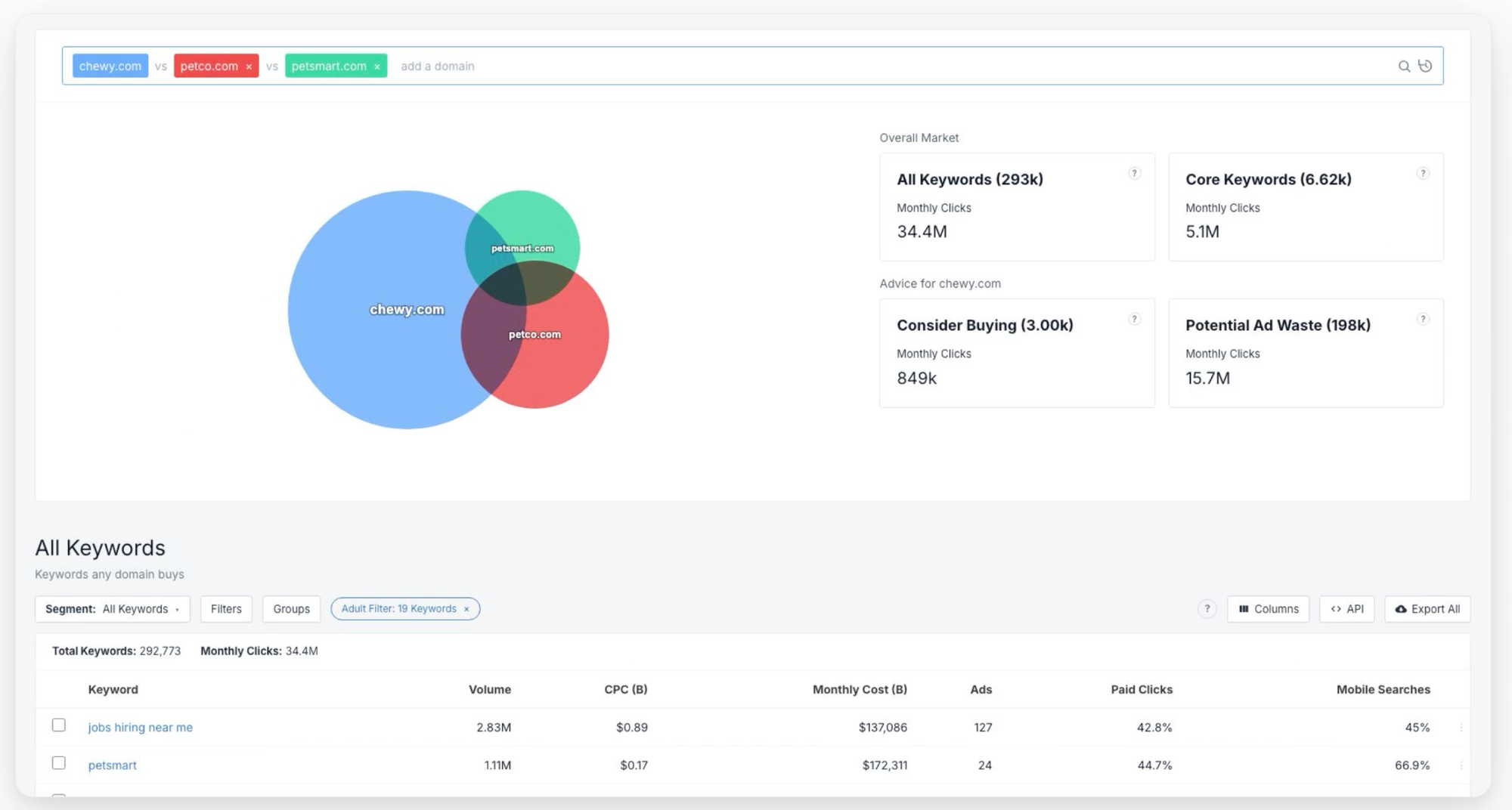
You can use SpyFu to find the keywords a domain ranks for. Then open Kombat and add two or three competitors.
Look at the keywords they rank for but you don't. Those are some of the first gaps I'd investigate.
Find the topics you haven't covered yet
Keyword rankings are only part of the picture. You also need to look at whether you've covered the questions buyers ask as they move through the decision-making process.
For each topic cluster, list the main subtopics: definitions, comparisons, pricing, how-to guides, and alternatives. Then check whether you have a page for each one.
Let's say you run an email verification tool. Your coverage might look something like this:
| Subtopic | Page exists | Ranks on page one |
|---|---|---|
| What is email verification? | Yes | Yes |
| Email verification vs. validation | Yes | No |
| Email verification pricing compared | No | No |
| How to verify an email list in bulk | Yes | Yes |
| Best email verification tools | No | No |
In this example, you're missing two pages, and another isn't ranking as well as it could. That's a pretty clear starting point for your content plan.
Make sure your titles and internal links make sense
There's another detail worth checking. Look at how closely your page titles match the questions people ask.
When ChatGPT searches for information, it can break a prompt into several smaller queries. In its study, Ahrefs found that cited pages had titles more closely aligned with those queries, with a similarity score of 0.60 compared with 0.48 for pages that were retrieved but not cited.
In practice, this means a title like "Email Verification vs. Validation: What's the Difference?" is usually a better fit for that query than something vague like "Our Thoughts on List Hygiene."
You should also check that related pages link to one another and back to the main pillar page. If you've published several articles about the same topic but they don't connect, both search engines and visitors may have a harder time navigating your content.
We'll look at orphan pages in the next step, which can help you spot where those connections are missing.
Step 3: Make sure AI crawlers can access your website
If GPTBot can't access a page, or it can only see an empty shell, the rest of your audit won't help much. If you only have an afternoon to work on AI search readiness, I'd start here.
Start with a site audit
A site crawl is a good way to catch several problems at once. SpyFu's Site Audit is intended to help identify issues such as broken internal and external links, crawlability and sitemap problems, duplicate content, and orphan pages.
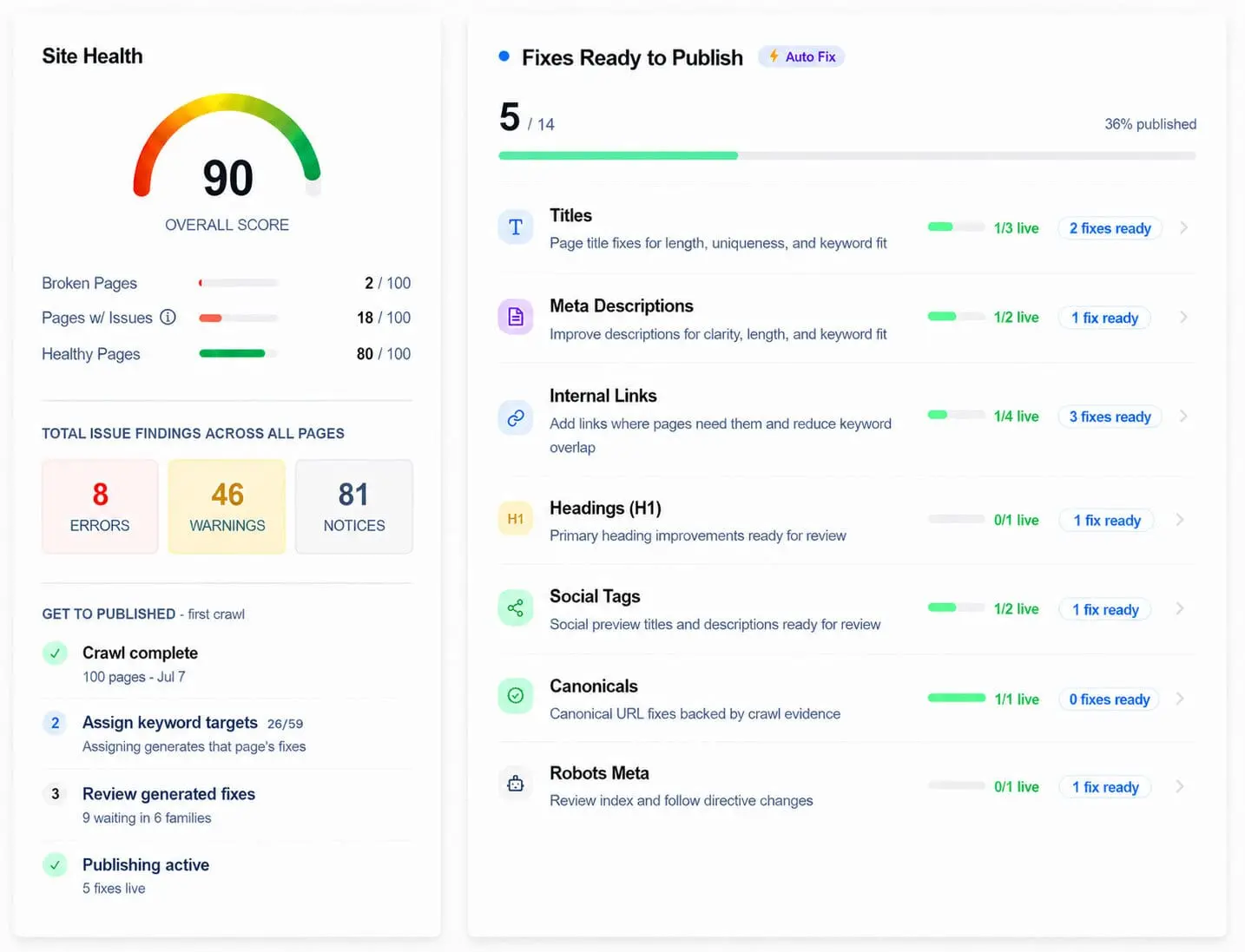
Start with broken links and pages that crawlers can't access.
A study by Vercel and MERJ found that around 34% of fetches from ChatGPT and Claude hit 404 pages. That's a lot of wasted requests. If a crawler keeps running into dead URLs, you're making it harder for it to retrieve the information you're trying to get discovered.
Check your robots.txt file
Next, open yourdomain.com/robots.txt and look for rules that block AI crawlers.
Some of the user agents worth checking are:
- GPTBot, OAI-SearchBot, and ChatGPT-User from OpenAI
- ClaudeBot from Anthropic
- PerplexityBot from Perplexity
- Google-Extended for certain Google AI uses
If you want to allow these crawlers across your site, you can add rules like these:
|
Just remember that different crawlers serve different purposes, and allowing one doesn't automatically allow the others. Check each provider's documentation and your own access requirements before changing anything.
Artisan is one example of a company that explicitly allows GPTBot and OAI-SearchBot in its robots.txt file. That helps make its public pages accessible to those crawlers.
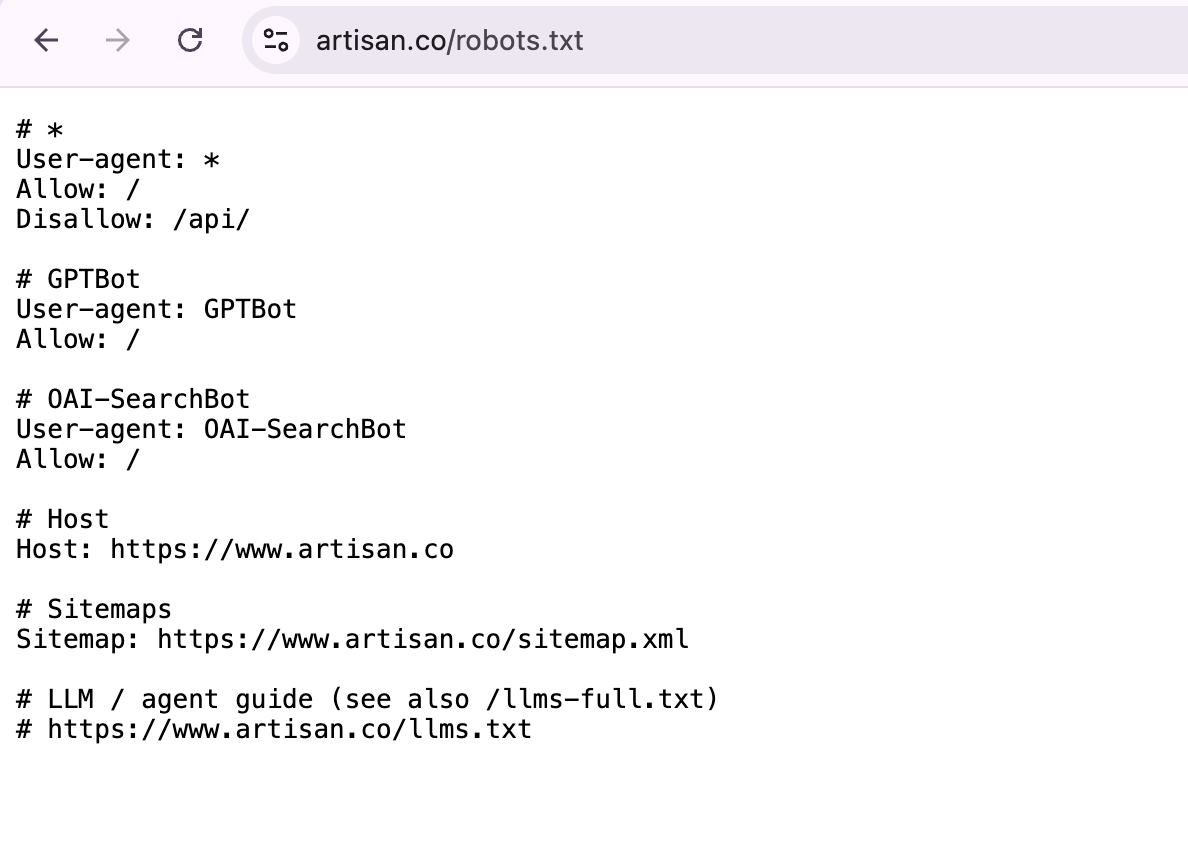
One more thing, check your CDN and firewall settings. They can block bots even when your robots.txt file allows them.
See what your pages look like without JavaScript
Here's where things can get a little technical.
The Vercel study found that major AI crawlers generally don't execute JavaScript when fetching pages. In other words, they may download the page without running the scripts that load or display its content.
Try this yourself. Open your pricing page, right-click, and select View Page Source. Search for your plan names and prices.
If they're missing from the HTML, don't assume an AI crawler will see them just because they appear in your browser. Ask your developers to check whether server-side rendering or another approach can make the important content available in the initial HTML.
Add llms.txt, but don't stop there
You've probably heard about llms.txt by now. It's a plain-text file intended to help language models understand a website and find its important pages.
It's easy to add, and companies like Artisan publish one that describes their product and links to key pages.
But I'd treat it as an optional extra, not the foundation of your AI search strategy. There's still limited public evidence that major AI engines consistently use llms.txt, so I'd prioritize crawlability, accessible content, and technical SEO first.
Step 4: Make your content easy for AI to understand and quote
AI tools don't always use an entire page to answer a question. They often pull a specific passage and use it on its own.
That means your content needs to make sense even when someone reads just one section without the rest of the article.
Here's how to prevent that from happening to you.
I use a simple test for this. I call it the pull-quote test.
Copy a section of your page into a blank document and read it without any surrounding context. Does it still answer the question? Or does it rely on earlier paragraphs to make sense?
Here's an example that doesn't pass:
“As we covered above, there are a few things to keep in mind here. It really depends on your setup, but most teams find this approach works well for them.”
Now compare it with this:
“Email verification checks whether an address exists and can receive mail. Run it before every campaign to keep your bounce rate under 2%.”
The second version gets straight to the point. It names the subject, explains what it does, and gives the reader a useful benchmark. An AI tool can understand the passage without needing the rest of the article.
Start with your 10 highest-traffic pages rather than trying to rewrite your entire blog. On each page, look for these things:
- Answer-first paragraphs. The first sentence under a heading should answer the question, not spend three sentences building up to it.
- Question-style headings. Headings like "How much does X cost?" match the way people ask questions in AI tools.
- Short definitions. Explain key concepts in one or two sentences. A simple "X is Y" structure often works well.
- Comparison tables. If you're comparing several products, features, or pricing plans, a table can make the differences much easier to follow.
- Clear, descriptive URLs. In the Ahrefs study, pages with natural-language slugs were cited 90% of the time, compared with 81% for other pages.
It's not just about individual paragraphs, either. Your overall site structure matters.
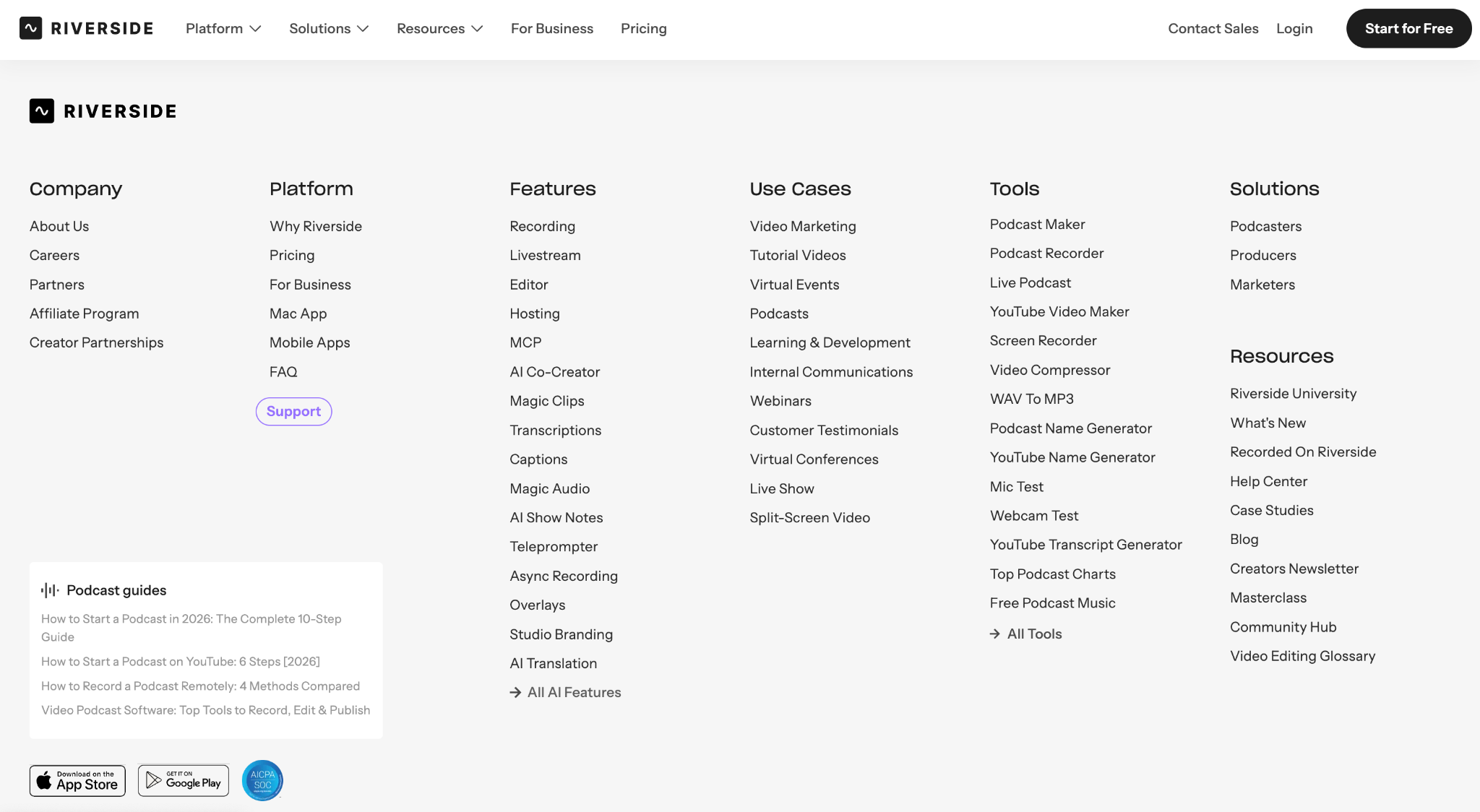
Take Riverside as an example. It has a standalone FAQ page and separate product pages for different jobs, including recording, editing, live streaming, and podcast hosting. That gives visitors and search engines clearer places to find information about each use case.
One word of caution, though; don't overdo it.
I've seen teams rewrite their content so aggressively for AI that it starts reading like a form instead of something a person would actually want to read. That doesn't help your readers, and I haven't seen evidence that making everything sound robotic gets you more AI citations.
Keep the writing natural. Use structure to make it easier to understand, not to make it sound like a machine wrote it.
And while you’re at it, don’t treat AI as a shortcut to more content.
Publishing hundreds of AI-generated pages won’t make you more visible in AI search. I’ve seen it go the other way. A former client switched to mass AI content production, and their search visibility dropped sharply soon after.
Google’s spam policies call this “scaled content abuse”: pages produced in bulk mainly to rank, not to help anyone. And if you stop ranking, you also drop out of the pool AI engines pull from (remember step 2).
Ten pages that answer real questions will do more for you than a thousand that repeat what’s already out there.
Step 5: Make it clear who your brand is and what you do
AI tools need to understand your brand before they can recommend it confidently. If your website describes your product one way, LinkedIn describes it another way, and review sites use a third description, you're making that job harder.
An entity is simply something a search engine or language model can recognize as a distinct thing, such as a company, product, or person.
Your job is to make it easy for AI to identify your brand and understand what makes it different.
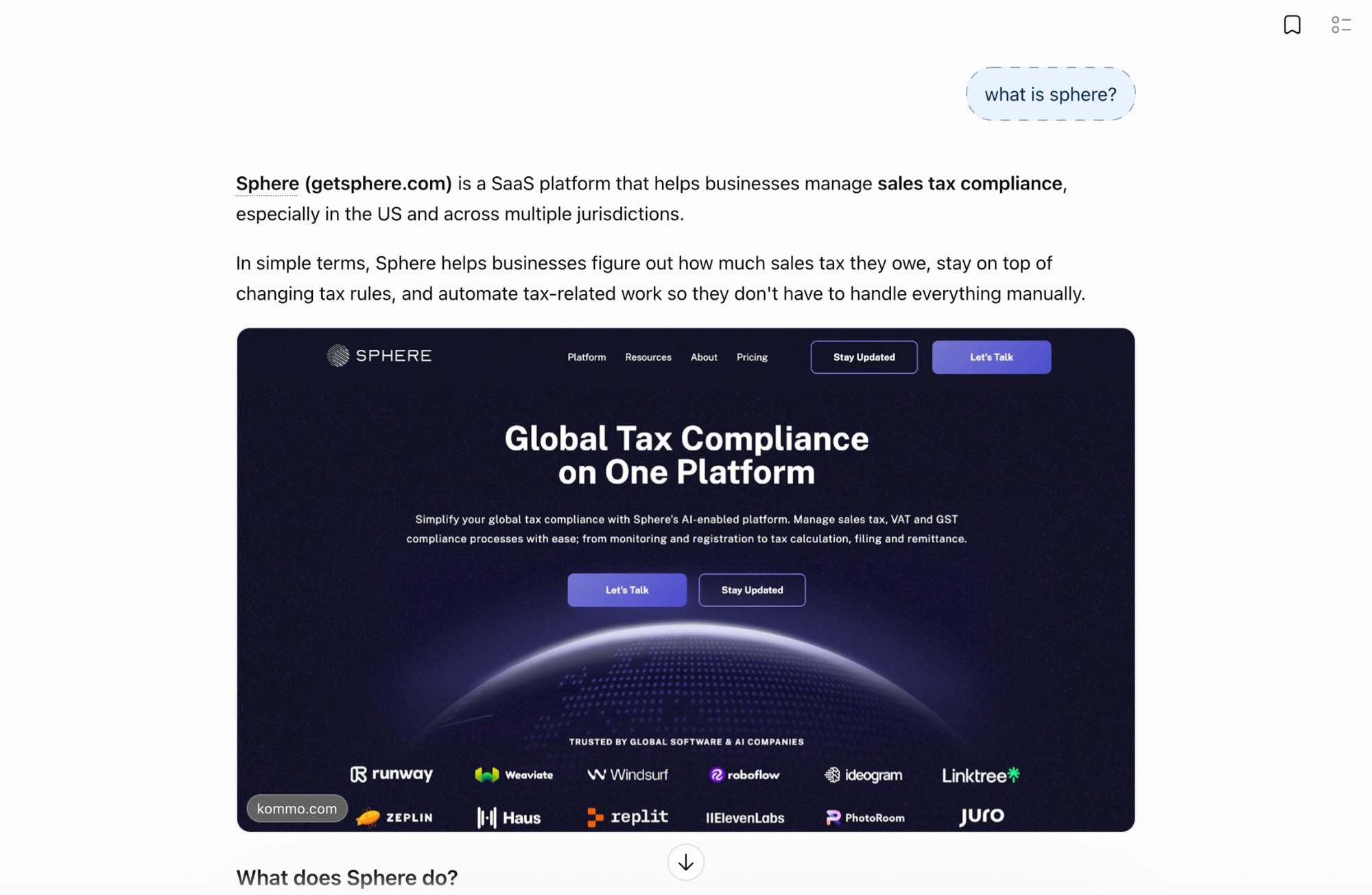
Here's a quick test. Ask ChatGPT, "What is [your brand]?" Then compare its answer with the headline on your homepage.
Does the answer describe your business accurately? Does it put you in the right category? If not, you've found something worth investigating.
From there, I'd check three things.
Use the same brand description everywhere
Start with a one-sentence description of your business. It should explain what you do, who you do it for, and, where relevant, what makes your product different.
Then check that the description is consistent across your homepage, About page, LinkedIn, G2, and Crunchbase.
Sphere is a good example. Its homepage describes it as an AI-native platform that automates VAT, GST, and sales tax compliance across more than 130 jurisdictions.
In one sentence, you know what the product is, what it does, and the scope it covers.
Check your schema markup
Schema markup is code that helps search engines understand what a page contains. It can identify things like your organization, software product, articles, and FAQs.
For a SaaS website, I'd start by checking the relevant Organization, Product or SoftwareApplication, FAQ Page, and Article markup, including named authors where appropriate.
Run your key pages through a schema validator and fix any errors before adding more types. Make sure the markup matches what's actually visible on the page, too.
Make your pricing easy to find
People ask AI tools about pricing all the time. I now track visits to pricing pages from LLM referrals as a separate metric because it's a useful way to see whether AI discovery is bringing people closer to a purchase.
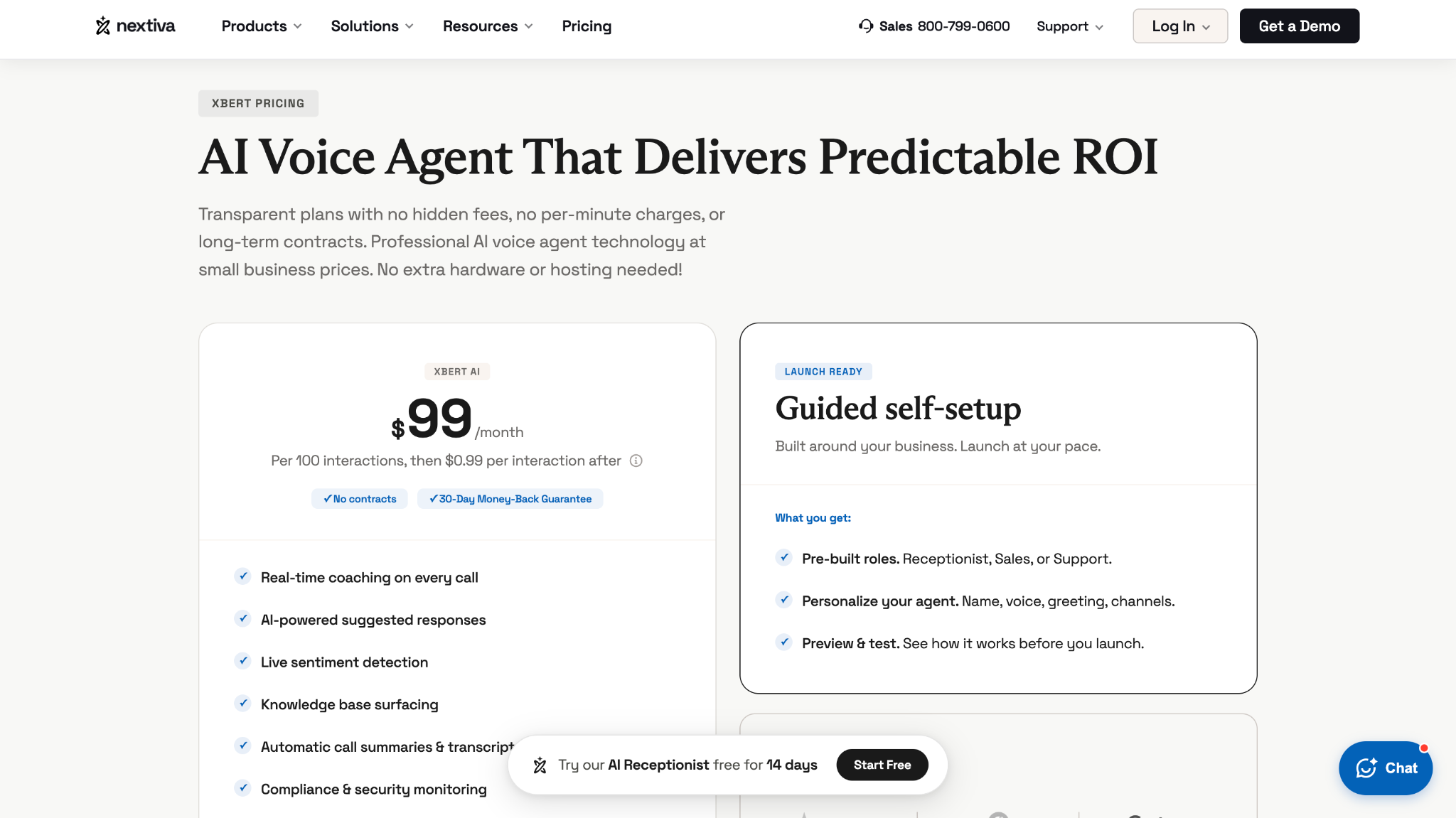
If your pricing is buried in an image or hidden behind a "Contact us" button, an AI assistant may not be able to give an accurate answer. It might leave you out of the comparison or point the user toward a competitor with clearer pricing.
Nextiva handles this well on the page for XBert. Its pricing is written out in text, including the starting price of $99 per month for the first 100 interactions and $0.99 for each additional interaction.
That gives an assistant something concrete to work with when someone asks, "How much does XBert cost?"
Step 6: Check whether your brand has enough proof behind it
It's one thing to tell people you're great at what you do. It's another thing to have evidence that backs it up.
AI tools draw on information from your own website and other sources around the web. So you need to check both what you're saying about yourself and what other people are saying about you.
Start with the trust signals on your own site
Go back to your 10 most important pages and check four things.
- Authors: Does every article have a byline that links to an author page with real experience or relevant credentials?
- Sources: Are statistics linked to their original sources? Saying "most marketers agree" isn't enough.
- Freshness: Are your last-updated dates visible, and have you removed outdated pricing, retired features, and old product descriptions?
- Customer proof: Do your product and pricing pages include relevant customer logos, case studies with real numbers, or review badges?
- Customer experience: Do your site and review profiles show what it's actually like to be your customer, such as onboarding steps, support options, response times, and customer stories with specific outcomes?
You don't need to add all of these to every page. Focus on the information that helps readers verify your claims and make a decision.
See what other websites say about you
Now look beyond your own site.
Go back to the spreadsheet from step 1 and find the 10 pages AI tools cite most often for your category prompts. These might be software review sites, "best X" listicles, or product comparison articles.
Are you mentioned on those pages? Is the information accurate and up to date? Are your competitors getting coverage that you're missing?
To find more opportunities, use backlink checker tools to see which comparison pages and listicles link to your competitors. Then reach out to the publishers that cover your category but leave your brand out.
Reddit is worth looking at, too, but the numbers need some context.
In the Ahrefs study, Reddit accounted for 68% of the pages ChatGPT retrieved but didn't cite. It was cited less than 2% of the time.
In other words, ChatGPT may use Reddit discussions to understand a topic or gauge what people think, then cite a different source in its answer.
That's why I wouldn't focus on Reddit just to earn links. Instead, look for relevant discussions where people are asking questions about your category. Share useful answers, correct outdated information about your product when appropriate, and contribute something genuinely helpful.
Just don't expect the impact to show up neatly in your AI visibility dashboard.
Step 7: Prioritize the gaps and fix the easiest wins first
By now, you should have a list of things to fix. The next step is deciding what to tackle first.
I'd rank each issue by its likely impact and the effort needed to fix it. Start with access problems, then move on to content and brand-related issues. There's no point polishing a paragraph if AI crawlers can't access the page in the first place.
I like to put everything into one table so the team can see what's working, what needs attention, and who owns each fix.
Here's an example of what that might look like for a mid-sized SaaS website:
| Step | Status | Effort | Owner |
|---|---|---|---|
| 1. Baseline | Pass | Low | SEO lead |
| 2. Topical coverage | Partial: 2 of 5 clusters have gaps | High | Content |
| 3. Crawler access | Fail: pricing content is rendered in JavaScript | Medium | Engineering |
| 4. Content structure | Partial: 6 of 10 pages pass | Medium | Content |
| 5. Entity signals | Partial: schema errors on product pages | Low | SEO lead |
| 6. Trust signals | Fail: missing from 7 of 10 cited listicles | High | PR and outreach |
In this example, I'd start with crawler access, then work on ranking and topic coverage, followed by content structure, entity signals, and trust.
The pricing issue and schema errors are both worth investigating early because they're relatively straightforward fixes. Once those are sorted, you can move on to the bigger content and outreach projects.
After the changes go live, run another site audit and compare the results with your original crawl. Keep tracking the keywords from step 2 so you can see whether your rankings improve as you close those gaps.
Measure what actually changed
"Did traffic go up?" isn't enough to tell you whether your AI search work is paying off.
Here are the five metrics I'd keep an eye on instead:
- Branded impressions. Check brand-related queries in Google Search Console. If more people are searching for your brand, that's a useful sign that awareness may be growing.
- Share of voice in AI search. Track how often your brand appears across your prompt set compared with your competitors.
- Direct and organic clicks to your homepage. These can help you spot changes in how people discover and navigate to your brand.
- AI visibility by topic. Track your mention rate for each topic cluster instead of treating every prompt as equally important.
- AI traffic and conversions. Look at whether visitors arriving from AI tools are signing up, requesting demos, or becoming customers.
I go into these metrics in more detail in my previous SpyFu post on SEO performance in a zero-click world.
One thing I'd recommend is setting expectations with your boss before your next report. You might not see traffic increase right away, even if your visibility and conversions are improving.
For example, one SaaS company I reviewed lost 77% of its clicks year over year but still had its most profitable year, with three times as many organic conversions.
We've also seen that people arriving from ChatGPT often already understand the category and know which products they're considering. That can mean less time spent explaining the basics and more time talking about whether the product is right for them.
The point isn't to ignore traffic. It's to look at the bigger picture and understand whether your visibility is bringing in the right people.
What to do next with your AI search audit
Start by benchmarking your visibility, filling your topic gaps, checking crawler access, making your content easier to quote, clarifying your brand, and building trust. Then prioritize the fixes that will make the biggest difference.
You won't be able to measure every factor that affects AI visibility. Nobody can yet. So focus on the signals you can track, especially branded demand and conversions, instead of worrying about every individual citation.
If you only have time for one thing this week, start with step 3. Run a SpyFu Site Audit, check your robots.txt file, and view the source of your pricing page.
It should take an afternoon, and it can help you catch some surprisingly costly problems.
The sooner you start checking these things, the sooner you can fix the gaps that might keep your brand out of the answers people get from AI tools.
We invited Irina to share her thoughts in this SpyFu Community guest post.
