
Most sites should run a full SEO audit every three to six months, with lighter checks in between. Large sites, online stores and anything that changes daily need a tighter rhythm (monthly full audits and weekly monitoring). A small site that rarely changes can get by with a full audit twice a year.
That's the short answer. The longer one is that "how often" depends less on the calendar and more on how fast your site changes.
Every new page, plugin update, redesign or CMS migration is a chance for something to break quietly. A noindex tag left over from staging. A robots.txt rule that blocks more than it should. A batch of product pages that lost their titles.
None of those wait for your next scheduled audit. So the better question is: how long are you willing to let a problem sit before you know about it?
In this guide, we'll cover:
- A recommended audit schedule by site type
- The difference between a full audit and ongoing monitoring (and why you need both)
- The events that should trigger an audit right away
- What to check at each interval
This post is about timing. Once you have results, here's how to prioritize what you find.
A Recommended SEO Audit Schedule by Site Type
Use this as a starting point. If your site changes faster than the row suggests, move up a row.
| Site type | Full audit | Ongoing monitoring | Why |
|---|---|---|---|
| Small business or brochure site (under ~50 pages, few updates) | Every 6 months | Monthly | Few changes means fewer chances to break something, but plugin and theme updates still do it. |
| Content site or blog (publishing weekly) | Every 3 months | Weekly | New posts add new titles, links and images every week. Orphan pages and duplicate titles pile up quietly. |
| Ecommerce store | Monthly | Weekly, daily in peak season | Products come and go, filters create duplicate URLs, and out-of-stock pages turn into broken links. |
| Large or enterprise site (thousands of pages, several teams publishing) | Monthly, by section | Daily or weekly | Many hands on the site means more unreviewed changes. Audit in sections so each crawl stays useful. |
| Agency client sites | At onboarding, then quarterly | Weekly | The first audit sets the baseline. Recurring checks let you spot problems before the client does. |
| Site in the middle of a redesign or migration | Before, at launch, and 2–4 weeks after | Daily for the first month | Migrations are where redirects, canonicals and indexing settings break most often. |
Two things stretch or shrink these numbers:
- How competitive your search results are. If rankings in your space move every week, a problem that sits for a month costs more.
- How much of your revenue comes from organic search. The more it matters, the less time you can afford between checks.
Full Audits vs. Ongoing Monitoring
A lot of the confusion around audit frequency comes from treating "audit" as one thing. It's really two jobs.
A full audit is the deep look. You crawl the whole site (or a full section of it), review every issue type, compare against the last audit, and decide what to fix next. It takes time to review, so it happens on a schedule.
Monitoring is the regular patrol. A scheduled crawl runs in the background and watches for the problems that can't wait: the homepage returning an error, Google blocked by robots.txt, an expired SSL certificate, a sudden wave of pages set to noindex. You don't review everything each time. You look when something changes.
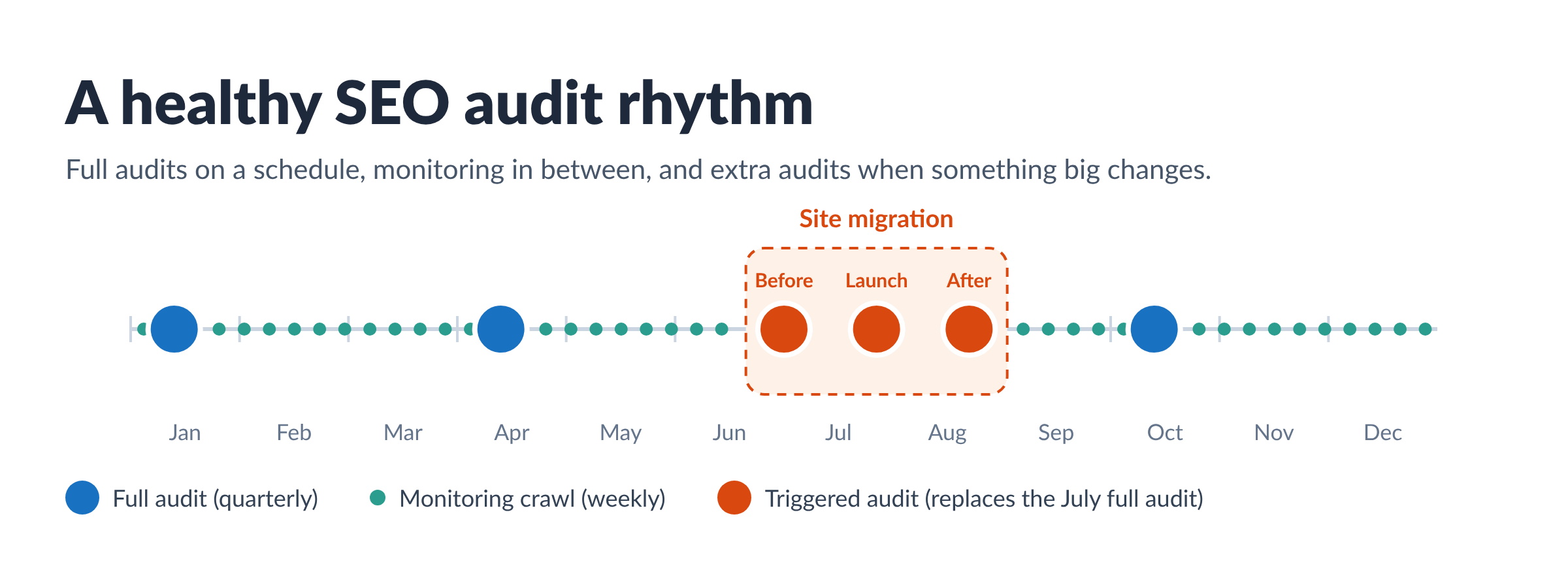
Think of it like a car. You get a full service a few times a year, but you still glance at the dashboard every time you drive. Skipping the dashboard because the next service is booked is how a warning light turns into a breakdown.
The two work together:
| Full audit | Monitoring | |
|---|---|---|
| Goal | Find and plan improvements | Catch breakages fast |
| Scope | Every issue type, every crawled page | Site-level problems and changes since the last crawl |
| Your time | An hour or more to review and plan | A few minutes, only when something is flagged |
| Output | A prioritized list of fixes | An alert, or nothing at all |
Most teams under-monitor and over-audit. They run a big audit, get a long list, and then nothing runs again until next quarter. A scheduled crawl is what closes that gap.
7 Times to Run an SEO Audit Right Away
A schedule covers the normal weeks. These events call for an audit now, no matter when the last one ran.
1. Before and after a site migration or redesign
This is the big one. Domain changes, CMS moves, URL restructures and redesigns are where redirects break, canonical tags point to the wrong place, and staging settings like noindex make it to the live site. Audit the old site first so you have a baseline, crawl the new site on launch day, and audit again two to four weeks later.
2. After a sudden traffic drop
When organic traffic falls and you can't explain it, a crawl is the fastest way to rule technical problems in or out. Check indexability, robots.txt, status codes and canonicals first. If those are clean, the cause is more likely rankings or demand, and your keyword ranking data becomes the next place to look.
3. After a Google algorithm update
Core updates usually reward or punish content quality more than technical setup. Still, an update is a good moment to confirm nothing on your end is making things worse, especially if your traffic moved.
4. After a CMS, theme or plugin update
Small updates cause outsized problems. An SEO plugin update can reset title templates. A theme change can drop H1 tags from every page. A security plugin can start blocking crawlers.
5. After publishing or removing a lot of pages
Adding a new product category or pruning old blog posts changes your internal linking. New pages can end up orphaned, and removed pages leave broken links behind.
6. Before peak season or a big campaign
If you're about to send paid traffic, run a seasonal promotion or launch a product, audit a few weeks ahead. You want time to fix what you find before the traffic arrives.
7. When you take on a new site or client
A first audit sets the baseline. It tells you where the site stands before any of your changes, which is what you'll measure progress against later.
What to Check at Each Interval
Not every check needs the same rhythm. Here's how to split the work so the frequent checks stay quick and the deep ones stay thorough.
Every crawl (weekly or daily monitoring)
These are the problems that can take a site out of search results. Look at them every time.
- Homepage status (is it returning an error or redirecting somewhere it shouldn't?)
- Robots.txt (can Google and Bing still crawl the site?)
- Indexability (did a large share of pages suddenly turn noindex?)
- SSL certificate (valid, and not about to expire?)
- Server errors (a spike in 5xx errors usually means hosting trouble)
- Your overall health score trend (a sharp drop is a signal to dig in)
Monthly
- Broken internal links and links to redirects
- New pages missing title tags, meta descriptions or H1s
- Duplicate titles and descriptions across pages
- Orphan pages (pages with no internal links pointing to them)
- AI search crawler access (are bots like OAI-SearchBot and PerplexityBot allowed or blocked?)
Quarterly (the full audit)
- Everything above, plus a full review of every issue type
- Canonicals, redirect chains and sitemap health
- Content quality flags: thin pages, near-duplicates, low readability
- Site speed and Core Web Vitals and page experience
- Structured data errors
- Progress since the last full audit: which issues you fixed, which came back, and what's new
Once or twice a year
- Site architecture and internal linking strategy
- A content audit (what to update, merge or retire)
- A competitive check on how your visibility compares to the sites you're up against
A free tool like Google Search Console is worth checking alongside all of this. It shows indexing and Core Web Vitals data straight from Google, which complements what a crawler finds.
How SpyFu Site Audit Keeps Recurring Audits on Track
The hard part of a regular audit schedule isn't running the crawl. It's what happens after. Each audit produces a list, the list waits for someone to have time, and by the next audit half of it is still open.
SpyFu Site Audit is built to close that gap, so each audit moves from finding issues to fixing them faster.
- Scheduled crawls. Set a crawl schedule in Crawl Settings and each audit runs on its own. You can also raise the page limit from the 100-page default to cover the sections you report on.
- Site-level alerts at the top of every crawl. Every crawl checks for the serious problems (a failed crawl, a blocked homepage, certificate trouble) and flags them at the top of your Overview, including what changed since the last crawl.
- A health score that trends over time. Your score and issue counts track across crawls, so quarter-over-quarter progress is right there for your reporting.
- Fixes that are already written. For titles, meta descriptions, headings, image alt text and social tags, SpyFu writes the fix around the keyword each page already ranks for. You review it, edit anything you want, and publish. Nothing changes on your site until you do.
- Confirmation that fixes went live. After you publish, SpyFu re-checks each page and marks confirmed fixes "Live on your site." One click undoes any fix.
- AI search access checks. See which AI crawlers (from ChatGPT, Perplexity, Google and Claude) can reach each page, and which are blocked.
That changes what a recurring audit is for. Instead of producing the same list every quarter, each crawl confirms what you fixed and puts the next most valuable fix at the top.
SpyFu's Site Audit tool is included with new subscriber plans, starting at $59 a month.
If you're still comparing options, our roundup of the best SEO audit tools covers features and current pricing side by side.
Frequently Asked Questions
Is once a year enough for an SEO audit?
For most sites, no. A year is long enough for a theme update, a plugin conflict or a batch of new pages to cause problems that sit unnoticed for months. Once a year can work for a very small site that rarely changes, as long as something is monitoring it in between.
How often should you do a technical SEO audit?
A full technical audit every three months suits most sites, with weekly monitoring for site-level problems like robots.txt blocks, server errors and indexing changes. Large sites and online stores benefit from monthly full audits.
How long does an SEO audit take?
The crawl itself is usually quick. A 100-page crawl in SpyFu Site Audit takes about five minutes. Reviewing the results and deciding what to fix takes longer, which is why tools that prioritize issues and write the fixes for you shorten the whole cycle.
Can you audit too often?
Not really, as long as the crawl doesn't strain your server. A crawler that respects a crawl delay puts little load on most sites. The real risk of frequent audits is reviewing the same unfixed list over and over, which is a sign the fixes need a faster path to implementation.
Should agencies audit client sites on a set schedule?
Yes. Audit at onboarding to set a baseline, run a full audit quarterly, and keep weekly monitoring running in between. That way you hear about a broken page before your client does.
