Most websites don’t lose search visibility in one dramatic moment. Small, minor things tend to add up: A plugin update duplicates your meta tags. A redirect chain grows one hop at a time. Or maybe a new product page launches without a single internal link pointing to it.
Nobody notices until traffic dips, and it's not always a single cause.
An SEO site audit tool is how you catch those problems before they grow into something bigger.
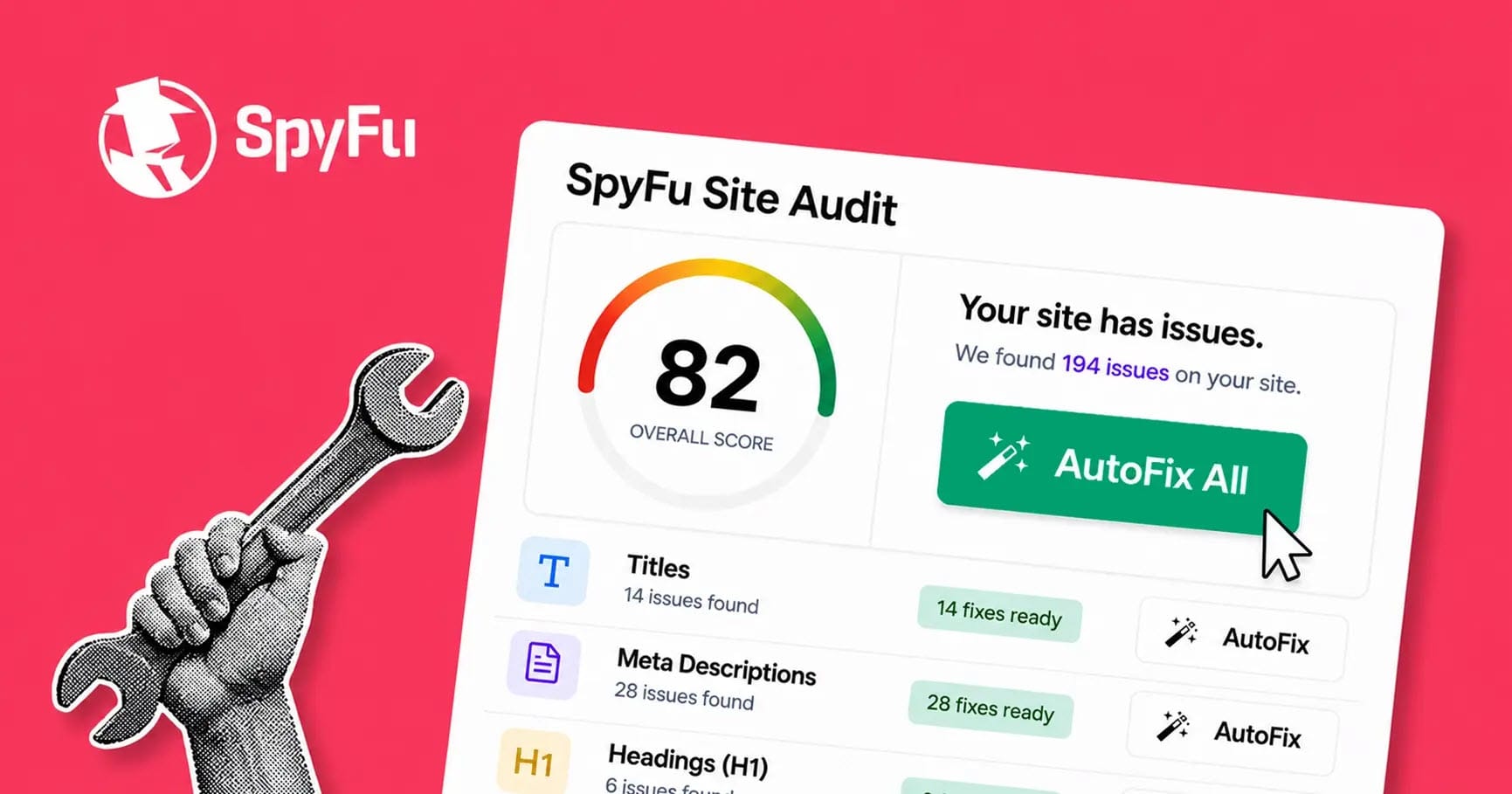
That's where SpyFu's site audit tool supports your site so that it's optimized, user-friendly, and puts your best foot forward.
What Exactly Does This Do for my Site?
It crawls your site the way a search engine does, checks every page against the technical, on-page, and content factors that affect rankings, and tells you what needs attention.
But finding issues is the easy part. Most sites have dozens of them at any given time. The harder part (and the part that actually moves rankings) is knowing which ones matter, what the fix looks like, and getting it done before the next crawl turns up something new.
In this guide, we’ll cover what an SEO site audit tool does, why you need one even if your site looks fine, what it should check, and how to choose one that helps you fix issues, not just list them.
What Is an SEO Site Audit Tool?
An SEO site audit tool is software that crawls your website, evaluates each page against SEO best practices, and reports the issues that could keep your pages from ranking. Think of it as a regular inspection for your site. It looks for the things that are hard to spot by clicking around: broken links, missing tags, pages search engines can’t reach, and content that’s too thin to compete.
How a site audit tool works
Nearly every audit tool follows the same basic sequence.
- Crawl. The tool starts at your homepage and follows links from page to page, the same way Googlebot does. It reads the HTML (and, on JavaScript-heavy sites, the rendered page) and records what it finds. A crawl is read-only. Nothing on your site changes.
- Analyze. Each page is checked against a set of rules: Does it have a unique title tag? Does it return a 200 status code? Is it indexable? Does anything link to it?
- Report. The results roll up into a list of issues, usually grouped by category and severity, often with an overall site health score on top.
That’s where many audits stop. You get the report, and it’s up to you to decide what to do with it.
The more useful tools keep going. They prioritize the issues so you know where to start, generate recommendations for the fixes, and help you implement them and confirm they worked.
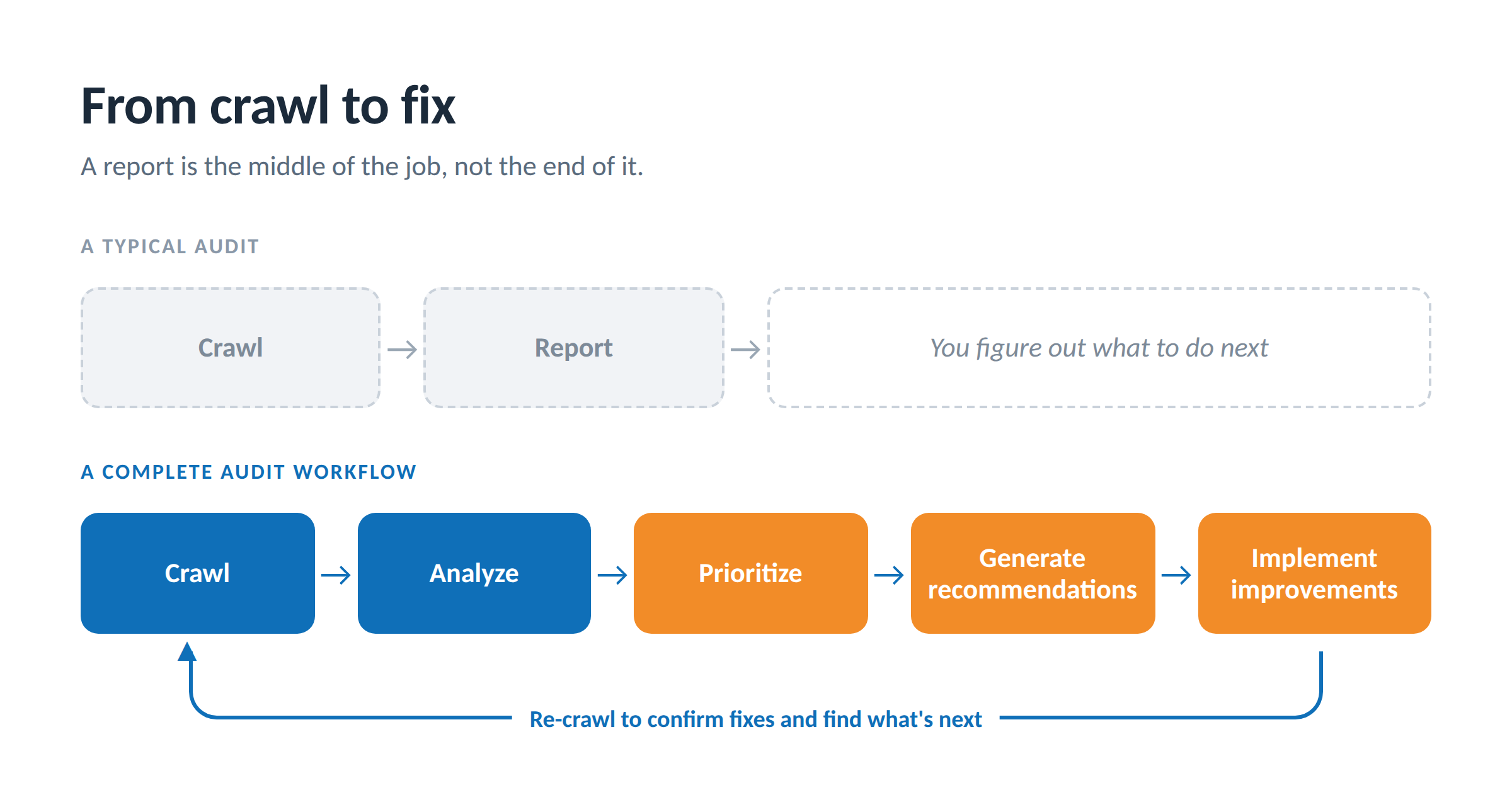
The gap between step three and step five is where most SEO work stalls. A report full of findings doesn’t improve anything until someone acts on it.
Why You Need a Site Audit Tool (Even If Your Site Looks Fine)
A site can look perfect to visitors and still send search engines mixed signals. Most technical SEO issues are invisible from the front end. You won’t see a noindex tag left over from a staging site, a canonical pointing to the wrong URL, or a sitemap that stopped updating three months ago. A crawler will.
Here’s what a good audit tool gives you.
Hours back on every audit
You can audit a site by hand. Our SEO audit checklist walks through it step by step. But checking title tags, status codes, and internal links page by page across a few hundred URLs takes days. A crawler does it in minutes, and it does it the same way every time.
Problems caught before they cost you
Sites change constantly. New pages go up, plugins update, developers push code, and content gets moved. Each change is a chance for something to break. Regular audits turn “why did traffic drop?” into “we caught that last Tuesday.”
A clear order of operations
Not every issue deserves the same attention. A blocked homepage is an emergency. A slightly long meta description on a low-traffic page is not. A good tool sorts issues by severity and impact so you spend your time on the fixes that matter first.
Proof that the work is working
Whether you report to a boss, a client, or just yourself, you need to show progress. A site health score and issue counts that trend over time give you a before-and-after you can point to, with the specific pages behind every number.
Visibility in AI search
AI search tools like ChatGPT, Perplexity, and Google’s AI features send their own crawlers to read your pages. If your robots.txt or CDN settings block them (which can happen without anyone meaning to), your content can’t be considered for their answers. Newer audit tools check which AI crawlers can reach each page.
Signs it’s time to run an audit
- Organic traffic dropped and you don’t know why
- You just migrated, redesigned, or changed CMS platforms
- A Google algorithm update rolled out
- You’re taking over a site (a new client, a new job, an acquisition)
- You’ve published a lot of new content and want to make sure it’s indexed and linked
- It’s been more than a month since your last one
What an SEO Site Audit Tool Checks
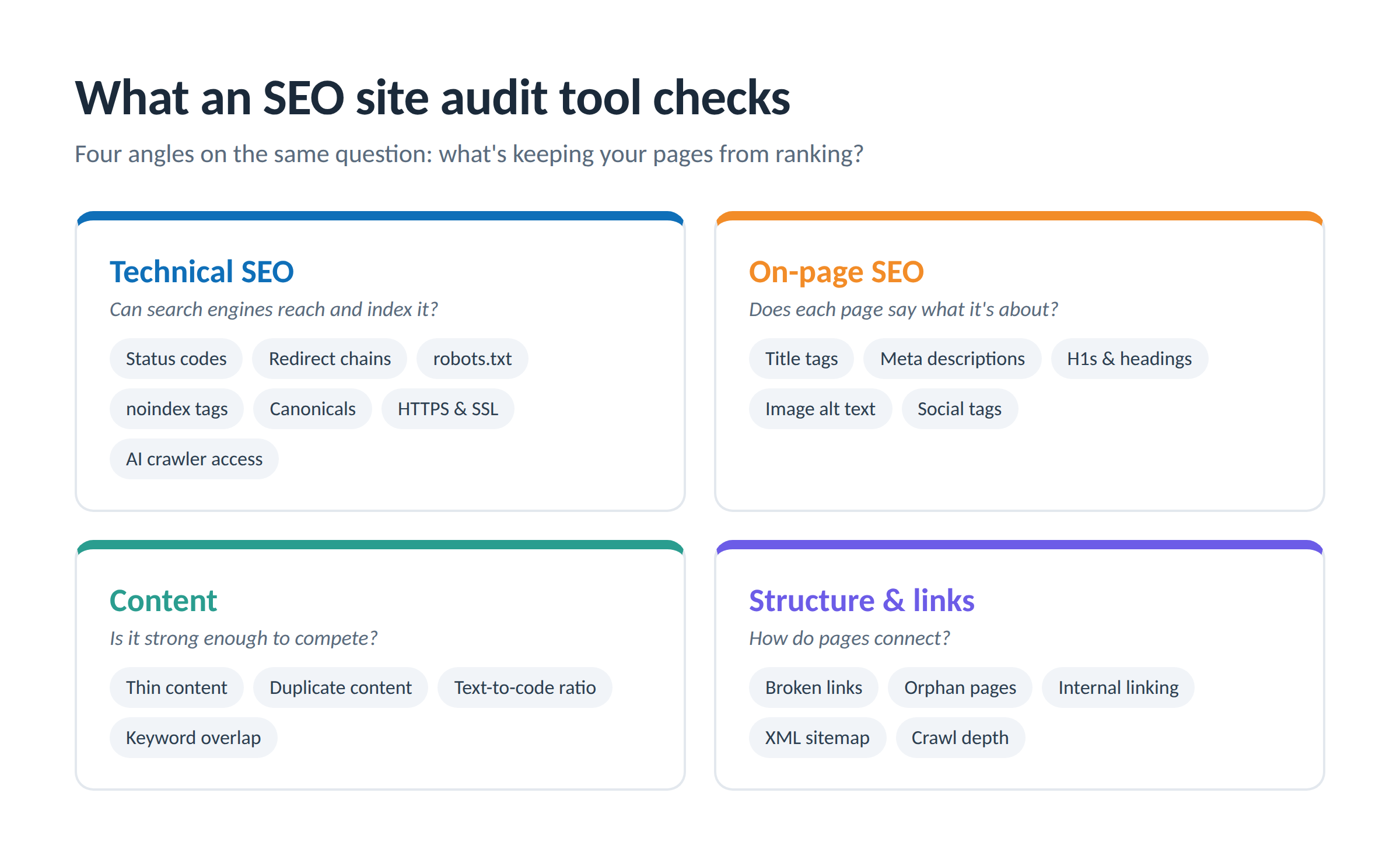
A comprehensive audit looks at your site from four angles: how search engines access it, how each page is optimized, the quality of the content, and how everything connects.
| Category | What it checks | Why it matters |
|---|---|---|
| Technical SEO | Status codes (4xx, 5xx), redirect chains, robots.txt, noindex tags, canonicals, HTTPS and insecure HTTP references, SSL certificates, crawl depth, page speed signals | If search engines can't reach or index a page, nothing else about it matters |
| On-page SEO | Missing, duplicate, or overlong title tags and meta descriptions, H1s and heading structure, image alt text, social (Open Graph) tags | These elements tell search engines what a page is about and shape how it looks in search results |
| Content | Thin content, duplicate content, low text-to-code ratio, pages competing for the same keyword | Search engines reward pages that clearly and fully answer one topic |
| Structure and links | Broken internal and external links, orphan pages, weak internal linking, XML sitemap coverage and consistency | Links are how crawlers discover pages and how authority flows through your site |
A few of these deserve a closer look.
Indexability
An indexable page is one that search engines are allowed to include in results. Pages can be non-indexable on purpose (login pages, internal search results) or by accident (a stray noindex tag, a misconfigured robots.txt). A good audit separates the two so you can catch the accidents.
Orphan pages and internal linking
An orphan page has no internal links pointing to it. Search engines may never find it, and if they do, it inherits little authority from the rest of your site. Internal linking analysis finds these pages and suggests where links should go, which is one of the fastest ways to lift pages you’ve already written.
Sitewide issues
Some issues show up on nearly every page because they come from a single template or CMS setting. They look alarming in an issue count, but they’re often the fastest to fix: one change to the template resolves it everywhere.
Site-level emergencies
A handful of problems affect the whole site at once: a homepage blocked from Google, an expired SSL certificate, a missing sitemap, or a crawl that fails entirely. These should sit at the very top of any audit, above the regular issue list.
If you want to understand each of these checks in depth (or run them manually), our step-by-step SEO audit checklist covers how to find and fix each one.
Site Health Scores and Prioritization: Deciding What to Fix First
The first time you audit a site, the issue count can be startling. Hundreds of warnings on a site that seems to work fine is normal. Issue counts tally every instance on every page, so one missing alt text pattern across 80 product images counts as 80 findings. The number of distinct problems is usually much shorter.
That’s why prioritization is the most important thing an audit tool does after the crawl.
What a site health score tells you
Most tools summarize your results as a score from 0 to 100. It’s weighted toward the issues that matter most for search performance, so fixing a serious error moves it more than clearing a minor notice.
A score is useful for tracking direction: is the site getting healthier from one crawl to the next? It’s less useful on its own. A score always needs the pages and findings behind it, especially when you’re sharing it with someone who will ask where the number came from.
Severity: errors, warnings, and notices
- Errors actively hurt search performance. Broken pages, blocked indexing, and broken internal links belong here. Fix these first.
- Warnings hold pages back without breaking anything. Duplicate titles, missing meta descriptions, and thin content are common examples.
- Notices are worth knowing about but rarely urgent. Fix them when you have time.
Type of fix
Severity tells you how important an issue is. The type of fix tells you how to get it done. Grouping issues this way helps you move fast on the easy wins and route the rest to the right person.
| Fix type | What it means | Example |
|---|---|---|
| Ready to deploy | The tool can write the fix, and you review and publish it | Rewriting a missing meta description |
| Needs review | The tool suggests a fix, but it needs your judgment | Choosing the right target keyword for a page |
| Developer fix | Requires a change to code, templates, or server settings | Fixing a redirect chain or server errors |
| Monitor | No action needed now, but worth watching | A low text-to-code ratio on a JavaScript-heavy site |
A simple order of operations
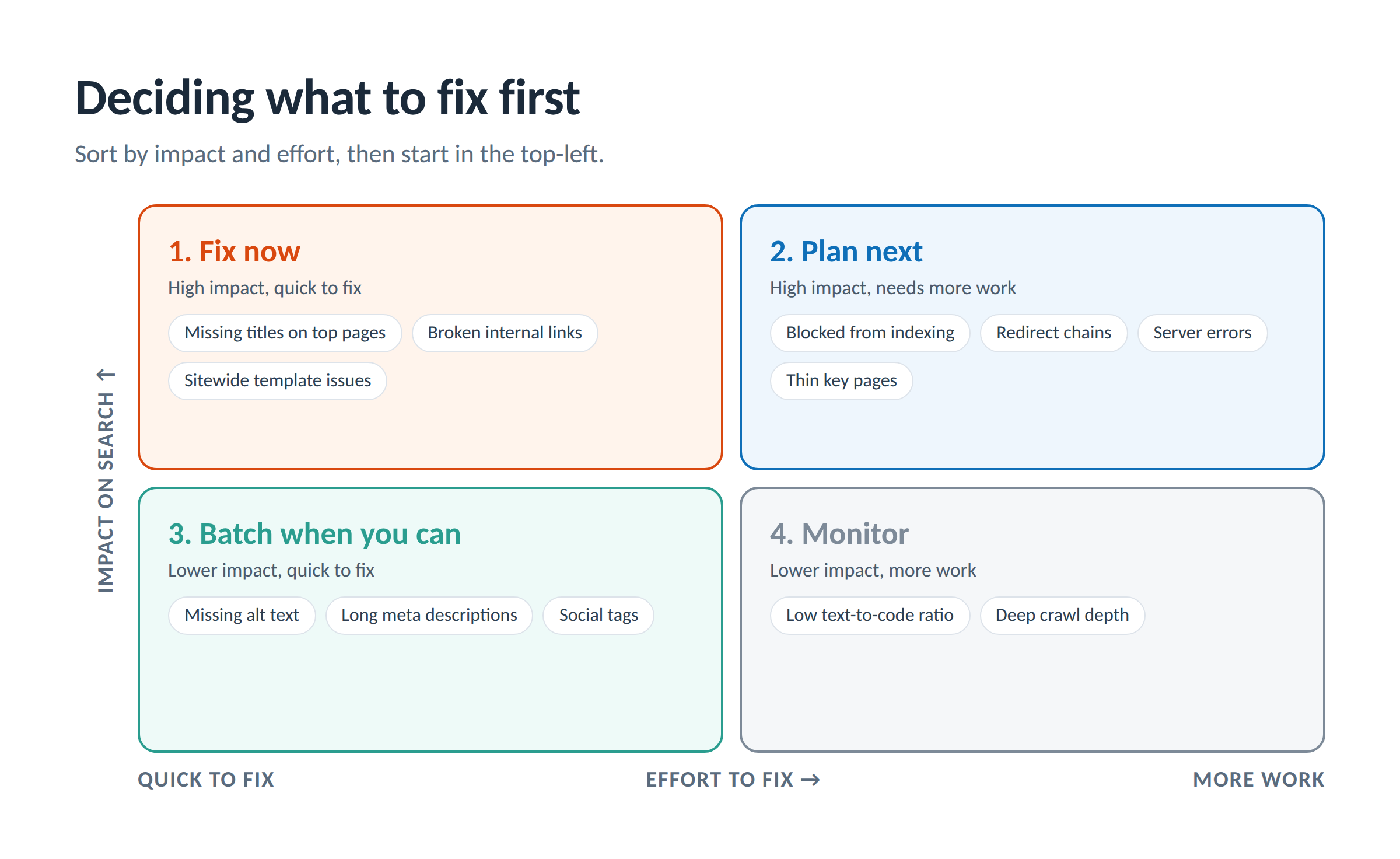
- Handle site-level emergencies first (blocked homepage, failed crawl, SSL problems).
- Fix errors on your highest-traffic pages.
- Clear the issues that can be fixed quickly, especially sitewide template issues.
- Work through warnings, starting with the pages that bring in the most visitors.
- Re-crawl to confirm the fixes and see what surfaces next.
Traffic data makes this much sharper. An error on a page that brings in thousands of visits a month deserves attention before the same error on a page that gets none. Tools that combine audit findings with page-level traffic data let you triage by what you’d actually lose.
AI-Powered Recommendations: Closing the Gap Between Finding and Fixing
A traditional audit tells you that 40 pages have missing meta descriptions. Then someone has to write 40 meta descriptions. That’s where audits tend to stall: the findings sit in a spreadsheet while the team works on everything else.
AI-powered recommendations change that step. Instead of only flagging the issue, the tool drafts the fix for you to review.
What AI recommendations can cover
- Title tags rewritten to match the page’s content and target keyword, within length guidelines
- Meta descriptions that are specific to the page and written to earn the click
- H1s and heading structure that clarify what the page is about
- Image alt text for images that are missing it
- Content suggestions for pages that are thin or underperforming
Here’s what that looks like on a single page:
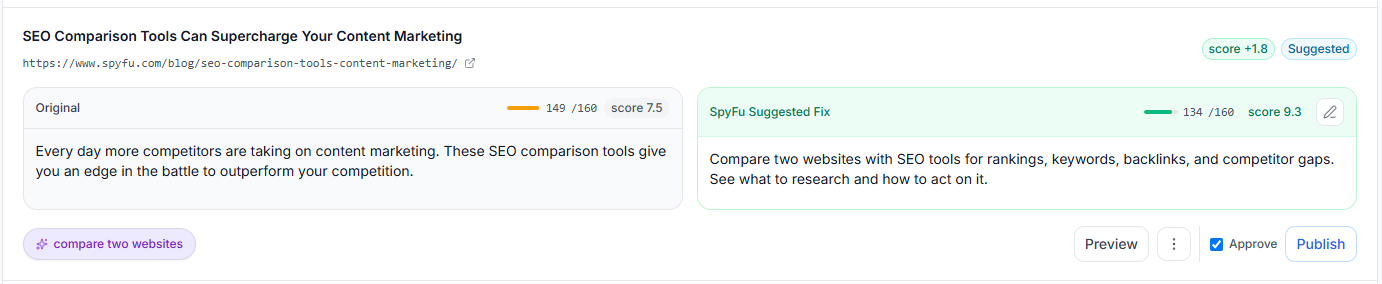
What makes recommendations worth trusting
The quality of an AI fix depends on what it’s built from. Recommendations anchored to a real target keyword (ideally one the page already ranks for) are far more useful than generic rewrites. Look for tools that tie each fix to keyword data rather than writing from the page text alone.
Just as important, you should stay in control. The right workflow is review, edit, publish, and undo if needed. You know your business better than any tool, so every recommendation should be a starting point you can change before anything goes live.
The result is less time between discovering an issue and improving the page. For agencies, that means more client work delivered in the same hours. For in-house teams, it means fixes that don’t wait months in a development backlog.
How to Choose an SEO Site Audit Tool
Most audit tools can crawl a site and list its issues. The differences show up in what happens after that. Use these questions when you compare options.
| Question to ask | What good looks like |
|---|---|
| How complete is the audit? | Covers technical, on-page, content, and structural issues, plus site-level emergencies and AI crawler access |
| Does it prioritize for me? | Severity levels, a health score, and issues sorted by impact, ideally using page-level traffic data |
| Does it show its work? | Every finding lists the exact pages affected, so you can verify it and hand it off |
| Does it help me fix issues? | Recommendations for titles, meta descriptions, headings, and alt text, not just "this is missing" |
| Do I stay in control of changes? | You review and edit every fix before it goes live, with an easy undo |
| Can I track progress? | Scores and issue counts that trend across crawls |
| Does crawl scope fit my sites? | A sensible default for fast results, with the option to crawl deeper on large sites |
| Does it fit my workflow? | Works alongside the keyword and competitor research you already do |
Match the tool to the job
- Agencies need audits they can run quickly across many client sites and findings they can defend in front of a client. See how to use site audits to win new SEO clients.
- In-house SEO teams need clear priorities, a progress number to report upward, and a way to get fixes done without waiting on a long dev queue.
- Freelancers need to save hours per client and deliver work that looks like it came from a bigger shop.
- Small business owners need plain-English explanations, clear next steps, and confidence that nothing changes on their site without their approval.
Putting Your Site Audit to Work
An audit is only as valuable as what you do with it. Here’s how audits play out in three common situations, with a deeper guide for each.
Auditing an ecommerce site
Online stores bring problems most sites never face: thousands of near-identical product pages, faceted navigation that creates duplicate URLs, and out-of-stock pages that need a plan. Scale makes prioritization even more important, because you can’t fix everything at once. Our guide to ecommerce site audits covers what to check beyond the basics and what to fix first.
Using audits to win new clients
For agencies and freelancers, a quick audit of a prospect’s site is one of the most persuasive sales tools there is. It replaces a generic pitch with real findings about their site, found and prioritized before the first call. Learn how to use site audits to win new SEO clients and turn it into a repeatable system.
Presenting results to clients and stakeholders
A 60-page PDF rarely gets read. The audits that lead to action translate findings into business terms, lead with priorities, and back every claim with the affected pages. Here’s how to run a client site audit from first crawl to presentation.
Pair your audit with competitive research
An audit tells you how healthy your own site is. Competitive research tells you where the opportunity is. When you know which keywords competitors rank for and which pages bring them traffic, you can prioritize audit fixes on the pages that compete for those terms. SpyFu’s keyword and competitor research tools are built for that second half of the picture.
SpyFu Site Audit: How it Works
SpyFu has spent years helping marketers see what’s working for their competitors. Our new Site Audit tool turns that same focus on your own site, with one goal: help you fix more of what it finds, faster.
Most audit workflows look like this: crawl, report, then figure out the next steps yourself. SpyFu Site Audit is built around a longer workflow: crawl, analyze, prioritize, generate recommendations, and implement improvements.
SpyFu's site audit tool includes:
- Comprehensive auditing across technical SEO, metadata, content quality, internal linking, sitemaps, crawlability, accessibility-related SEO, duplicate content, social metadata, and broken internal and external links
- Site Health scoring with errors, warnings, and notices, plus historical trends so you can see progress across crawls
- Intelligent prioritization that sorts issues by severity and by the kind of action they need, so you know where to focus first
- AI-powered recommendations for title tags, meta descriptions, headings, and alt text, built around each page’s Target Keyword
- Autofixes you review, edit, and publish (with one-click undo), so recommended changes don’t have to wait on a development queue
- Link Health reporting for broken internal and external links and insecure HTTP references
- Internal Link Opportunities that flag orphan pages and suggest page-to-page links
- Sitemap validation for discovery, missing pages, and consistency
- AI crawler access checks that show which AI search bots can reach each page
- Smart crawl management with a 100-page default for fast results and adjustable depth for larger sites
Because it’s part of SpyFu, the audit will sit alongside the keyword rankings and competitor data you already use. That means you’ll be able to see a page’s technical health and its search performance in the same place.
Pricing: SpyFu plans start at $59/month.
Frequently Asked Questions
What’s the difference between an SEO audit and a site audit?
An SEO audit is the full review of how well a site is set up to rank, including technical health, content, keywords, and backlinks. A site audit usually refers to the crawl-based part of that review: the technical, on-page, and structural checks a site audit tool automates. The tool handles the crawling so you can spend your time on strategy and fixes.
How often should I run a site audit?
Monthly works for most sites. Run one sooner after a migration, redesign, major content push, or Google algorithm update. Scheduled recurring crawls take the guesswork out of it.
Is a crawl safe for my site?
Yes. A crawl is read-only: the tool visits your pages and records what it finds, the same way a search engine does. Good tools also limit how many pages they crawl by default so they don’t put unexpected load on your server.
Can a free SEO audit tool do the job?
Free tools and Google Search Console are a good starting point, and every site should use Search Console. Free audit tools usually cap the number of pages, the depth of checks, or how often you can run them, and few help you prioritize or fix what they find.
What’s a good site health score?
It depends on the tool, but generally 90 and above is healthy, 70 to 89 has room to improve, and below 70 deserves attention. More important than the number is its direction over time and the specific pages behind it.
Does a site audit tool fix issues automatically?
Some tools now write the fixes for common on-page issues (titles, meta descriptions, headings, alt text) and let you publish them after review. Issues involving code, templates, or server settings still need a developer. Either way, you should approve every change before it goes live.
Does a site audit check whether AI search engines can see my site?
Newer tools do. They check whether AI crawlers from platforms like ChatGPT, Perplexity, and Google are allowed or blocked on each page. Being reachable doesn’t guarantee you’ll appear in AI answers, but being blocked rules it out.
Where can I get the SpyFu site audit?
SpyFu Site Audit is now available at https://www.spyfu.com/siteaudit
You can also navigate from the main page with Projects>Site Audit
