
Running an SEO audit on an e-commerce site is a different animal than auditing a blog or a service business. The scale is bigger, the duplicate content risks are more likely, and the problems that tank your rankings often have nothing to do with content quality. They're often structural.
A standard audit checklist will catch some of it. But if you're running a store with thousands of product pages, category filters, and constantly shifting inventory, you need to go deeper.
Here's what to look for beyond the basics.
E-Commerce Sites Need a Different Approach
Most SEO audit guides are written with a content site in mind: a few hundred pages, a blog, a handful of landing pages. The key issues that get flagged--missing meta descriptions, slow pages, broken links--apply to e-commerce too, but they shrink in importance if you haven't addressed the structural problems first.
E-commerce sites generate duplicate content at scale. A single product might appear under multiple category paths, with dozens of filter combinations, each creating its own URL. A standard crawler will flag all of them, but if you don't know why they exist or how to fix them, you're staring at a list of hundreds of issues with no clear place to start.
The good news: the structural problems are fixable. And fixing them often produces faster gains than content optimization alone.
Product Page Optimization
Product pages are your money pages. They're where conversions happen, and they're also where e-commerce SEO can easily get tripped up.
Title Tags and Meta Descriptions at Scale
If your store has 5,000 products, chances are a significant portion of them share templated title tags that look something like: [Product Name] | [Brand Name]. That's not wrong, but it's a missed opportunity — especially for products where the model number, color, size, or material would be what someone actually searches for.
During your audit, flag any product pages where:
- The title tag is shorter than 30 characters or longer than 60
- Multiple products share identical or near-identical titles (common with product variants)
- The title doesn't include the primary search term a buyer would use
The same applies to meta descriptions. They don't directly affect rankings, but a well-written meta description increases click-through rates. Considering the depth of an e-commerce site, even small improvements compound.
Thin Content on Product Pages
Thin content is a real problem on product pages — but it's worth being specific about what "thin" actually means. A product page with 50 words of description isn't automatically a problem if it's ranking well and converting. But if you have hundreds of pages with only manufacturer-supplied copy (which is duplicated across every retailer selling the same product), that's worth addressing.
Look for: pages with fewer than 200 words of unique, original content. Prioritize your higher-traffic and higher-margin products first.
Schema Markup: What You're Missing
Product schema is one of the highest-ROI technical fixes in e-commerce SEO because it directly affects how your listings appear in search results.
At minimum, your product pages should have:
- Product schema with name, description, image, and SKU
- Offer schema with price, currency, and availability
- Review/Aggregate Rating schema if you collect product reviews
Missing or broken schema means you're leaving rich result eligibility on the table — those star ratings and price ranges you see in search results aren't automatic. Check your implementation with Google's Rich Results Test and validate that availability and price fields are staying current as inventory changes.
Duplicate Content from Faceted Navigation
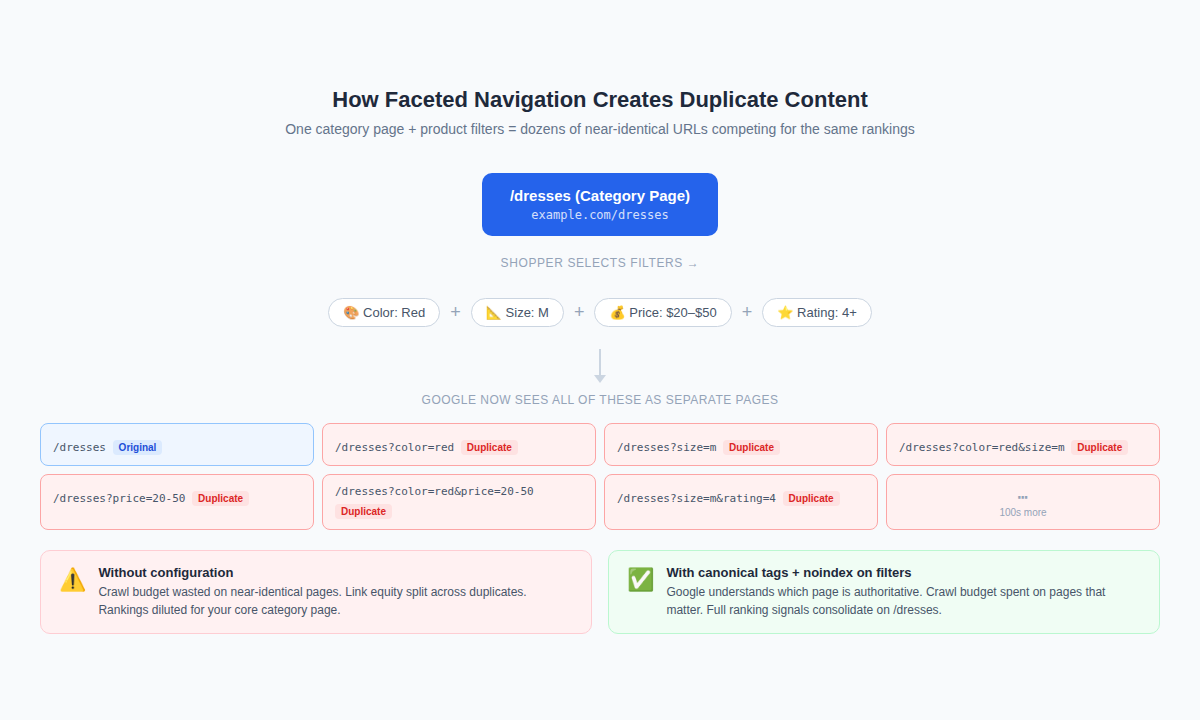
This is the issue that catches most e-commerce sites off guard. Faceted navigation — the filters that let shoppers sort by color, size, price, brand, and so on — is essential for user experience. For SEO, it's a duplicate content generator.
When a user selects "Red" and "Size M" on your category page, your site creates a new URL: /dresses?color=red&size=m. That page has nearly identical content to /dresses, /dresses?color=red, and dozens of other filter combinations. Multiply that across every category, and you can easily end up with tens of thousands of near-duplicate URLs that crawlers are wasting time on.
How to Handle It
There are a couple of main approaches, and the right one depends on your specific situation.
Canonical Tags
Canonical tags point filtered URLs back to the parent category page, telling search engines which version is the "real" one. This is the most common solution, but it has to be implemented correctly — self-referencing canonicals, or canonicals on pages that shouldn't have them, can cause more problems than they solve.
Noindex Tags
Noindex tags tell search engines not to index filtered pages at all. Use this when the filtered pages have no independent search value (most color/size combinations don't). The tradeoff: Googlebot may still crawl them, spending crawl budget on pages that don't contribute to rankings.
Pagination
Google no longer uses rel="prev/next" as a pagination signal, but that doesn't mean pagination is a non-issue. Paginated category pages can still dilute link equity and create indexation confusion. Make sure paginated pages are crawlable, that the content on each page is substantively different from the first, and that you're not accidentally canonicalizing all paginated pages to page 1 (a common misconfiguration).
Out-of-Stock and Discontinued Product Pages
Inventory changes constantly, and most e-commerce sites handle it inconsistently. Pages go dead, 404s pile up, and whatever links or rankings those pages had disappear with them.
There are three viable approaches for out-of-stock and discontinued products:
1. Keep the Page Live (Temporarily Out of Stock)
If a product is temporarily unavailable but will be back in stock, keep the page live. Update the page to communicate availability clearly, add an email notification option, and consider linking to similar in-stock products. This preserves any rankings and backlinks the page has built.
2. Redirect (Discontinued Products)
When a product is permanently gone, a 301 redirect is usually the right call — but redirect it somewhere relevant. A redirect to the category page is better than a 404. A redirect to a similar replacement product is better than a redirect to the category. What you want to avoid is redirecting to the homepage as a catch-all, which Google may start treating as a soft 404.
3. Let It 404 (When There's Nothing Better)
If a discontinued product page has zero backlinks, no traffic, and no SEO value, letting it 404 is acceptable. But before you do, check your analytics and crawl data. Pages that seem worthless sometimes have surprising link equity hiding in a forgotten corner of the web.
The Seasonal Inventory Problem
Seasonal products create a recurring version of this problem. Products that go out of stock every winter and come back every spring need a consistent handling strategy, or you'll rebuild rankings from scratch every year.
Site Architecture and Internal Linking
How your site is organized — the depth of its category hierarchy and how pages link to each other — has a direct effect on crawlability, link equity distribution, and rankings.
Click Depth
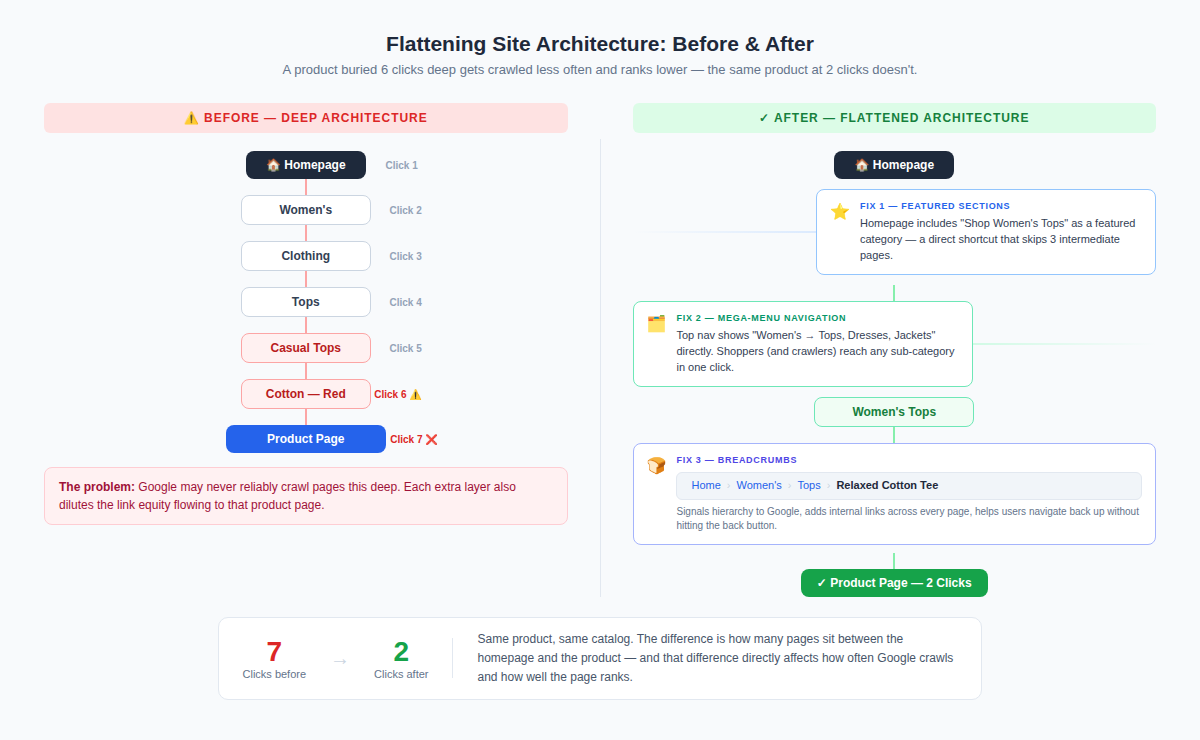
The number of clicks it takes to reach a product page from your homepage matters more than most people realize. Pages that are buried 5 or 6 clicks deep tend to be crawled less frequently and rank less well than pages within 3 clicks of the homepage.
Audit your click depth by mapping your site structure and flagging any product or category pages that require more than 3–4 clicks to reach.
Large catalogs make this challenging, but there are structural solutions: featured product sections, improved category navigation, and breadcrumbs all help flatten the architecture without sacrificing usability.
Orphaned Pages
Orphaned pages are pages that exist on your site but aren't linked to from anywhere. They may appear in your sitemap, but if no internal links point to them, crawlers have no reliable way to find them — and if crawlers can't find them, they won't rank.
Orphaned pages are especially common in e-commerce because of how product catalogs get structured and restructured over time. Run a crawl and compare the results against your sitemap. Any page that appears in the sitemap but receives zero internal links is orphaned and needs to be either linked to or removed.
Internal Linking Between Products and Categories
Internal linking in e-commerce improves crawlability, but more than that, it's about helping Google understand which pages are most important.
Your high-margin, high-conversion products should be linked to frequently from related category pages, blog content, and other relevant product pages.
"Related products," "frequently bought together," and "customers also viewed" sections are best-practice UX features, and (bonus!) they're internal linking opportunities. Make sure they're in use and pointing to your strategically important pages.
Technical Checks Specific to E-Commerce
Beyond the audit issues that apply to any site, a few technical problems show up with disproportionate frequency on e-commerce sites.
Page Speed on Product Pages
Product pages tend to be image-heavy, often with carousels, zoom functionality, video, and review widgets loaded on the same page.
We found a culprit on our site once where the automatic featured images on our blog turned out to be massive files. I didn't have to replace the images; I just had to resize them.
Any of those factors can cause (or add up to) slow load times. And yes, page speed is a ranking factor, but it's also a conversion factor: slow pages lose shoppers before they even see the product. Ouch.
Pay particular attention to:
- Image file sizes and format (WebP significantly outperforms JPEG and PNG for most use cases)
- Lazy loading for below-the-fold images
- Third-party scripts (review widgets, chat, personalization tools) that add significant load time
- Core Web Vitals scores on product pages specifically, not just your homepage
Crawl Budget
For sites with tens of thousands of URLs, crawl budget starts to matter. Google doesn't crawl infinite pages in infinite depth — if your site is generating millions of faceted navigation URLs, you may be spending crawl budget on pages that will never rank while important product pages get crawled infrequently.
Fixing faceted navigation (as covered above) is the biggest lever. Beyond that, review your robots.txt to make sure you're not blocking important pages, and check your server logs if you have access to them — they'll tell you exactly which pages Googlebot is spending time on.
HTTPS and Mixed Content on Checkout Flows
This should be table stakes at this point, but it still comes up: checkout flows that load assets (images, scripts) over HTTP while the page itself is served over HTTPS create mixed content warnings. On a checkout page, this is both an SEO issue and a trust issue that directly affects conversion rates.
Check your checkout flow end-to-end and flag any HTTP references. This includes third-party payment widgets, scripts, and images.
What to Prioritize First
A thorough e-commerce audit will surface more issues than your team can fix in a month. Prioritization is where audits either drive results or get shelved.
A simple framework: rank every issue by revenue impact and implementation difficulty, then work through them in this order:
- High impact, easy fix — Go first. These are your quick wins: missing canonical tags, misconfigured robots.txt, broken redirects.
- High impact, hard fix — Schedule these for your next sprint. Structural issues like faceted navigation and site architecture fall here.
- Low impact, easy fix — Handle these in batches when capacity allows. Missing meta descriptions, thin content on low-traffic pages.
- Low impact, hard fix — Deprioritize. These rarely justify the investment relative to other work.
The most important thing is to start. An audit that generates a prioritized list of 20 actionable fixes and gets them done is worth more than a comprehensive report that sits in a folder.
That's what we considered when we designed SpyFu's Site Audit tool. It helps you speed through those high and low impact easy fixes so you can start seeing benefits immediately.
An e-commerce site audit is an ongoing discipline. Inventory changes, categories get restructured, and new pages get added--which means new technical problems get introduced constantly. A regular audit cadence (quarterly for most stores, monthly for high-volume sites) is what keeps the technical foundation from becoming a drag on everything else you're doing.
