
Running a site audit for a client is two jobs, not one. The first job is the actual audit — crawling the site, analyzing what you find, and developing a clear picture of what's wrong and why it matters. The second job is the handoff: translating that picture into something a client understands well enough to act on.
Presenting a technical site audit to someone who doesn't speak SEO can be a big task.
A technically insightful audit that clients don't understand (or don't trust) doesn't build much trust. What separates agencies that get implementation traction from those that don't is usually how well they bridge the gap between findings and action.
This guide covers both jobs.
Before You Crawl: Setting Scope and Expectations
The biggest mistake agencies make with client audits is starting the crawl before having a clear conversation about what the audit is for. That sounds obvious, but it gets skipped constantly. There's a gap where we assume the client understands the value.
(Side note: that's an ongoing gap worth noting for any agency-client conversation.)
Discovery Questions to Ask First
Before you start an audit, spend 20–30 minutes getting answers to:
- What has recently changed? A site migration, redesign, new CMS, or major content overhaul can explain a lot of what you'll find. Knowing this upfront shapes how you interpret the data.
- Has this site been audited before? If so, what happened with the findings? Were they implemented? Is there a history of issues that have already been addressed — or flagged and ignored?
- What are the business goals? An e-commerce site trying to grow organic revenue has different priorities than a local services business trying to rank in one city. The audit should reflect what actually matters to them.
- Are there any known issues? Clients often have a list of problems they've noticed but haven't had the bandwidth to investigate. These are good starting points and help you build credibility fast when you confirm what they already suspected.
- Who will be responsible for implementation? Understanding whether you're working with an in-house developer, a third-party dev shop, or a content team changes how you structure your recommendations.
Agreeing on Scope
Not every audit covers everything. Before you start, establish whether you're looking at technical SEO only, on-page and content as well, backlinks, or the full picture. Scope affects timelines, deliverables, and what tools you need.
Undefined scope is where client relationships go sideways. If they expect a full site audit and you deliver a technical crawl report, you've already lost trust before the conversation about findings even starts. Hammer this out.
Running the Audit: What to Look At
Once scope is defined, the crawl itself is straightforward. Here's a working checklist organized by area:
Technical Health
- Crawlability and indexation: Is everything you want indexed actually indexed? Are important pages blocked by robots.txt or noindex tags?
- Redirect chains and loops: Every step in a redirect chain costs link equity. Chains longer than two hops need to be cleaned up.
- Broken pages: 404s that real users and crawlers are hitting — especially those linked from within the site itself.
- Page speed and Core Web Vitals: Particularly for mobile, where poor performance directly affects rankings and bounce rates.
- HTTPS: Are there mixed content issues, expired certificates, or pages still serving over HTTP?
- Mobile usability: Viewport configuration, tap target sizes, font sizes — Google crawls mobile-first.
On-Page Elements
- Title tags: Missing, duplicate, truncated, or keyword-poor titles.
- Meta descriptions: Missing or duplicated (they don't affect rankings directly, but they affect click-through rates).
- Heading structure: H1s present on every page? Multiple H1s causing confusion? Heading hierarchy that doesn't match page structure?
- Duplicate content: Pages with identical or near-identical content, whether from URL parameters, session IDs, or content republished across multiple pages.
- Image alt text: Missing alt text affects both accessibility and image search visibility.
Content
- Thin pages: Pages with minimal content that offer little value to users or search engines.
- Keyword cannibalization: Multiple pages competing for the same term, splitting ranking signals rather than concentrating them.
- Coverage gaps: Topics or questions the target audience is searching for that the site doesn't address.
Links
- Internal link health: Broken internal links, pages with no internal links pointing to them (orphan pages), and pages with excessive inbound internal links that may suggest structural imbalance.
- Internal link opportunities: Pages that could be linking to relevant content but aren't — a real driver of ranking improvement that often gets overlooked in favor of purely technical fixes.
- External links: Broken outbound links that erode credibility and user experience.
Prioritizing Findings for a Client Context
A thorough crawl of a mid-size site will typically surface hundreds of issues. Your client cannot fix hundreds of things. More importantly, most of those issues aren't equally important.
Prioritization isn't just a courtesy to the client — it's what makes the audit actionable.
Not Everything Belongs in the Report
This is a harder call than it sounds. Agencies feel a professional obligation to show everything they found, and clients sometimes interpret a shorter report as a less thorough audit. But a 200-item findings list almost guarantees nothing gets done, because no one can figure out where to start.
A better approach: build a comprehensive findings log for your internal records, then curate what goes into the client report based on actual impact. Items that won't meaningfully affect traffic, rankings, or revenue don't need to be featured prominently.
Impact vs. Effort
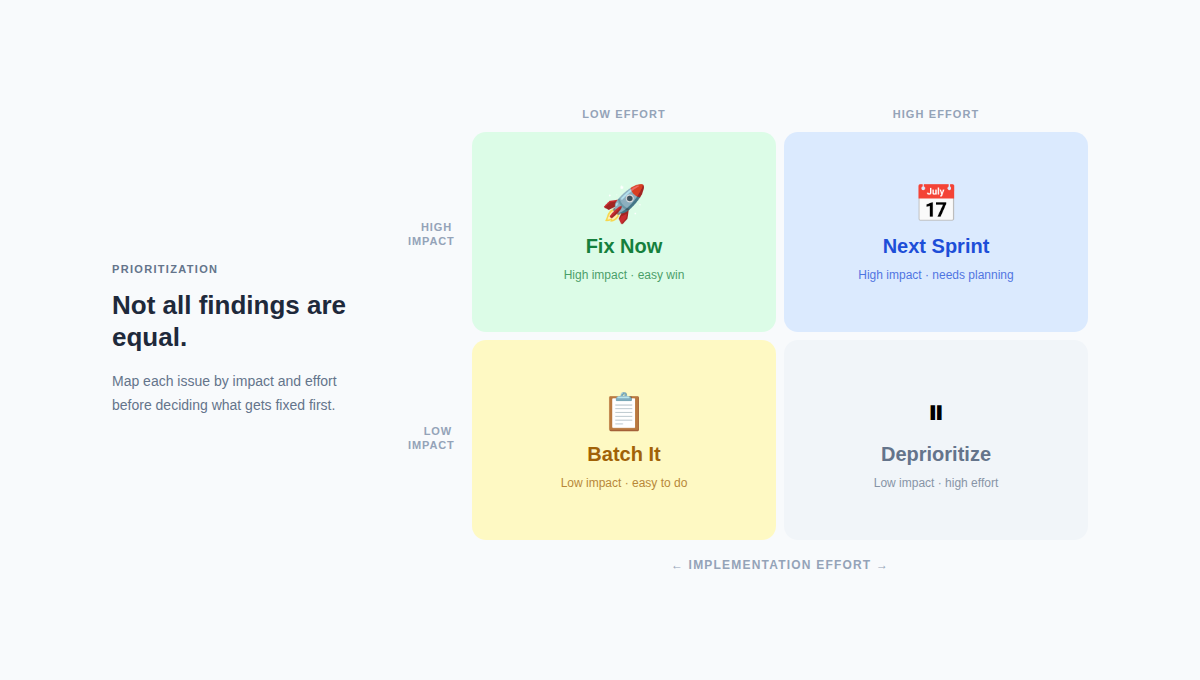
The clearest way to prioritize: rank every issue by its likely SEO impact and by how difficult it is to fix. Issues that are high-impact and low-effort go first. Issues that are low-impact and high-effort go to the bottom or get cut from the primary report entirely.
"This Is Broken" vs. "This Is Costing You Traffic"
There's a language distinction here that matters enormously in client-facing work. Telling a client they have 47 broken internal links describes a technical state. Telling them that three of those broken links are on their highest-traffic category pages — and that fixing them could recover rankings they've lost in the past six months — describes a business problem. One is a list. The other is a reason to act.
For every major finding, push yourself to answer: What is this actually costing them? Revenue? Rankings? Leads? If you can't answer that, it may not be a primary finding.
Presenting Findings to Non-Technical Stakeholders
This is where most agency-client relationships either solidify or start to crack. The person who commissioned the audit may be an SEO-literate marketing manager, but the people who need to approve the work and fund the implementation are often not SEO practitioners. They're business owners, CMOs, or heads of product — people who care about outcomes, not crawl errors.
Presenting well to this audience is a skill. Here's how to develop it.
Lead with Business Impact, Not Technical Details
The instinct in an SEO presentation is to walk through the audit findings in order of technical severity. Resist it. Start with what the client cares about — traffic, revenue, competitive position — and then connect the technical findings to those outcomes.
A good opening frame sounds like: "We found three categories of issues. The first group is actively costing you search visibility right now. The second group is structural — it won't hurt rankings in the short term, but it will limit your growth ceiling. The third group is maintenance — important, but lower urgency." That framing gives non-technical stakeholders a mental model before you start going through specifics.
Explain Crawl Errors Without Losing the Room
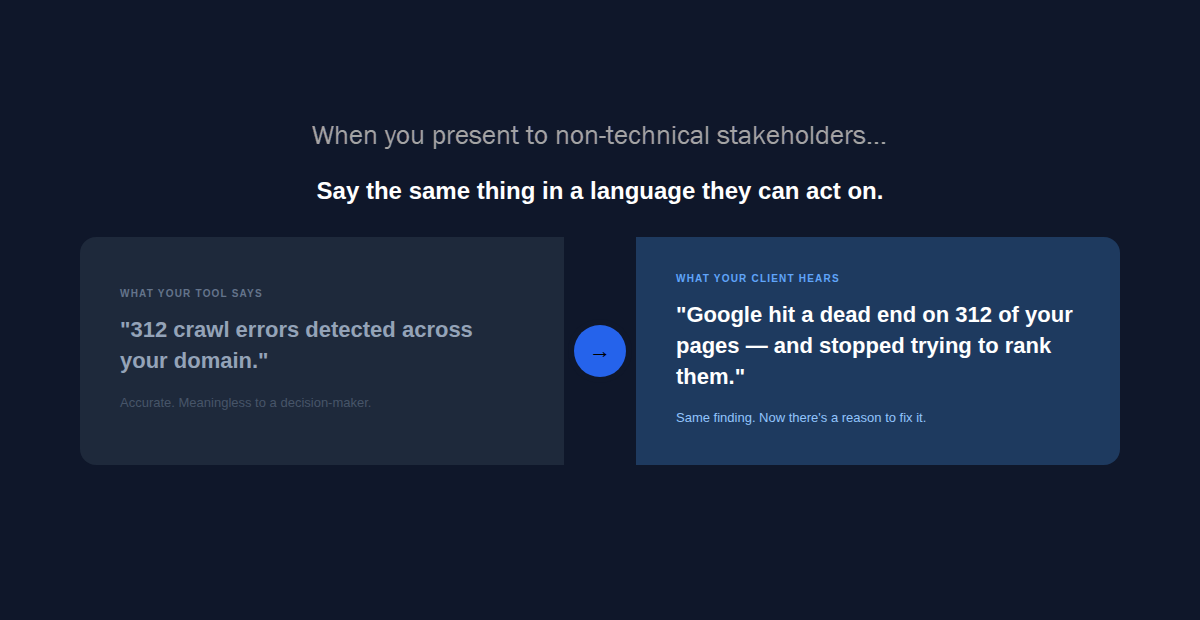
"You have 312 crawl errors" lands very differently than "When Google tries to access 312 pages on your site, it hits a dead end — like calling a phone number that's been disconnected. Google stops trying to visit those pages, and any rankings they had gradually disappear."
Plain-language translation isn't dumbing things down. It's making it possible for the people who need to make decisions to actually make them. Find an analogy for every major technical concept and use it consistently throughout the presentation.
Some that work well:
- Crawl budget → Google allocates a certain amount of time to exploring your site on each visit. If it wastes that time on broken or duplicate pages, it might not get to your most important product pages.
- Redirect chains → Every redirect is a turn on a road trip. One or two are fine. Five in a row, and you've added enough distance that some passengers give up before they arrive.
- Canonical tags → When you have two pages with similar content, a canonical tag tells Google which one is the original — like putting a "master copy" stamp on the version that should rank.
What a Good Executive Summary Looks Like
Before the detailed findings, give stakeholders a one-page summary that covers:
- Overall site health — a simple assessment (strong, needs attention, critical issues present)
- Top 3–5 priority fixes — with plain-language explanations of why each matters
- Quick wins — changes that can be made fast with meaningful impact
- What's working — don't skip this. Acknowledging what the site is doing well builds trust and prevents the meeting from feeling like an attack.
- What happens if nothing changes — not alarmist, but honest. Inaction has consequences, and stakeholders deserve to understand them.
Visualizing the Data
A well-designed slide or PDF goes a long way. A few approaches that work:
- Before/after projections: "If we fix the redirect chains on your top 20 category pages, here's our estimated impact on crawl efficiency." Estimates, clearly labeled as estimates, help stakeholders understand magnitude.
- Priority matrices: A simple 2x2 grid of impact vs. effort makes prioritization visual and easy to explain in a meeting.
- Health score over time: If you have historical data or can pull it from a tool, showing a trend line builds urgency when it's declining and demonstrates progress when it's improving.
- Competitive benchmarks: Where does the client's site health score stand relative to top competitors? This lands harder than any number in isolation.
Anticipating Pushback
In almost every audit presentation, you'll face some version of these objections:
"We just redesigned — why are there still this many issues?" A redesign is a high-risk event for SEO, not a clean slate. New platforms, new URL structures, and new templates often introduce technical problems even when the design improves. Explain this matter-of-factly, without assigning blame — the goal is to fix it, not to relitigate the redesign decision.
"We've had these issues for years and our traffic has been fine." This one is harder, because it might be true — some issues have less impact than others. Acknowledge it, then reframe: the question isn't whether the site survived these issues, it's whether they're limiting growth that could otherwise be captured.
"Our developer said this is working as intended." This comes up with faceted navigation, canonical implementations, and JavaScript rendering issues. Have documentation ready — Google's own developer guidelines, case studies, or supporting data. You're not arguing with the developer; you're aligning on what Google's guidance actually says.
Turning the Audit Into an Action Plan
A findings report is not an action plan. A findings report tells the client what's wrong. An action plan tells their team what to do, in what order, and who's responsible.
From Findings List to Prioritized Roadmap
Take your prioritized findings and translate them into tasks:
- Break each fix into discrete, assignable work items
- Assign each to the right owner: developer, content writer, or SEO (some fixes sit in gray areas — clarify upfront)
- Attach timelines: quick wins (this week), next sprint, next quarter
- Estimate effort in hours or story points if the client has a development team that works that way
If the client has project management tools they already use, offer to format the roadmap to match — a list in their Jira or Asana format is more likely to get executed than a PDF that lives in an email thread.
Tracking Implementation
The audit isn't done when you present the findings. It's done when the fixes are live and verified. Build checkpoints into the engagement:
- Follow up 2–4 weeks after delivery to check implementation status
- Re-crawl changed sections to verify fixes are working as intended (redirects that were meant to be 301s sometimes go live as 302s; canonical tags get added incorrectly)
- Report back on any ranking or traffic changes attributable to the fixes
This follow-up is where agencies demonstrate value beyond the initial deliverable. It's also how you identify the next set of priorities.
Making the Audit Stick: Follow-Up and Ongoing Monitoring
A site audit is a point-in-time snapshot. The moment it's complete, the site starts changing — new pages get published, developers push updates, content gets migrated. Issues you fixed can reappear; new issues get introduced.
Setting a Re-Audit Schedule
Recommend a re-audit cadence based on site activity. A large e-commerce site that publishes new products weekly needs monthly monitoring at minimum. A smaller B2B site that changes infrequently can get by with quarterly. Framing this as part of ongoing site health — rather than a one-time engagement — is accurate, and it gives clients a reason to continue the relationship.
Avoiding the One-and-Done Trap
The most common failure mode for agency-delivered audits: the client receives the report, a few quick wins get implemented, and then the rest of the findings get deprioritized as other business priorities take over. Three months later, new issues have accumulated and the original problems still exist.
The fix is structural: don't deliver audits as standalone documents. Deliver them as the foundation for an ongoing monitoring conversation. What are the three metrics we're watching? What triggers a re-audit? What does success look like at 90 days?
Clients who understand SEO as a continuous process ( and not just a one time fix) make better long-term partners. Part of your job as the agency is helping them get there.
Getting the technical analysis right is table stakes. What wins client trust — and gets recommendations actually implemented — is showing up as a translator between technical complexity and business priority. The faster you can move from crawl to clear, actionable recommendations, the more value you deliver, and the stronger the case for continuing the work.
