Links break, and to keep you on your toes– they break quietly. A page gets renamed during a redesign, an old post gets deleted, or a product sells out and its page comes down. The links pointing to those pages stay behind.
These simple things happen so often but ultimately, a visitor ends up at a dead end. That's not good for anyone.
Here's how to find broken links and redirect chains on your site, and which fix to use for each.
Broken links
A broken link points to a page that no longer loads. Usually the visitor lands on a "page not found" (404) error.
It doesn't matter if broken links affect your SEO. Broken links leave your visitor stranded and ruin all the work you put in to get them to your site.
A broken link usually loses your visitor, who may leave instead of looking further. It's a dead end for search engines too: they follow links to find and understand your pages, and a broken link leads nowhere.
Where they come from
- A page moved. Its URL changed, but links to the old address weren't updated.
- A page was deleted. An old post, a retired service or a discontinued product.
- A typo. One wrong character in the link's address.
- Another site changed. You linked to a page on someone else's site, and it's gone.
How to fix them
Work through each broken link and pick one fix:
- Update the link. If the page moved, point the link at its new address. This is the best fix, because the visitor goes straight to the right page.
- Link to a replacement. If the page is gone for good, point the link at the closest page you still have.
- Remove the link. If nothing fits, take it out and make sure the sentence still reads well.
I'm a big fan of good redirect habits, because it gives the visitor an option instead of leaving them at a complete stop. However, you have to stay on top of your redirect history so they don't pile up into a clumsy redirect chain.
Redirect chains
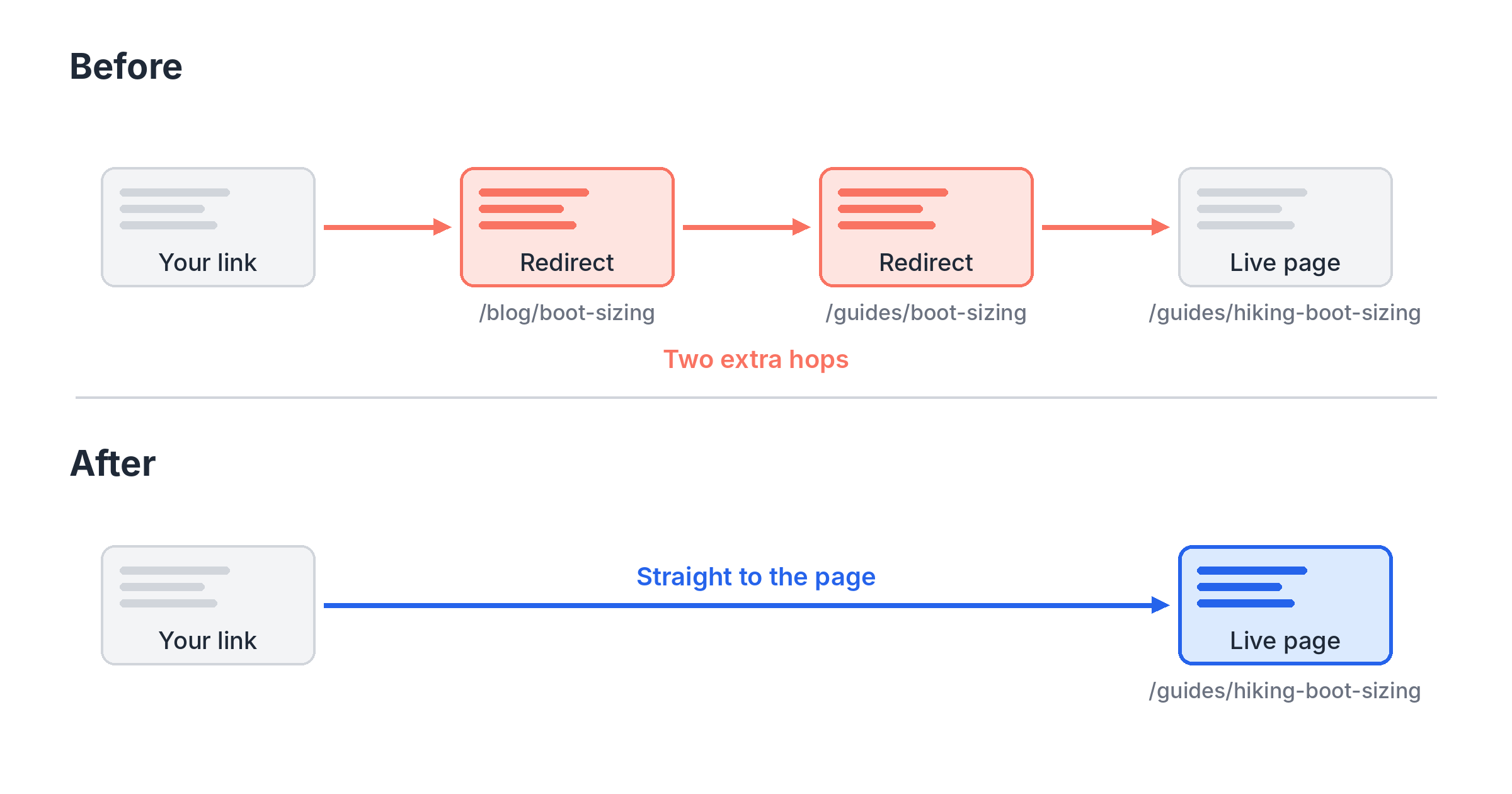
A redirect sends anyone who asks for an old address to a new one. A redirect chain is when that new address redirects again, and maybe again after that.
They build up over time. A page moves from /blog/boot-sizing to /guides/boot-sizing in one redesign, then to /guides/hiking-boot-sizing in the next. Each move gets its own redirect, and the old links now take two hops to arrive.
Each hop adds a little load time for visitors. Search engines follow the hops too, and a long chain can make them give up before reaching the page. If a chain ends at a page that's gone, it's a broken link in disguise.
How to fix them
- Point your links at the final address. Update links on your own site so they go straight to the live page, with no redirect at all.
- Shorten the redirects themselves. Change each old redirect so it points straight to the final page, not to the next step in the chain.
- Check for links that point at any redirect. Even a single hop is worth removing on your own pages. Your links are the easiest ones to update.
Where SpyFu Site Audit fits
Checking links by hand works for a handful of pages. Past that, you need a crawl.
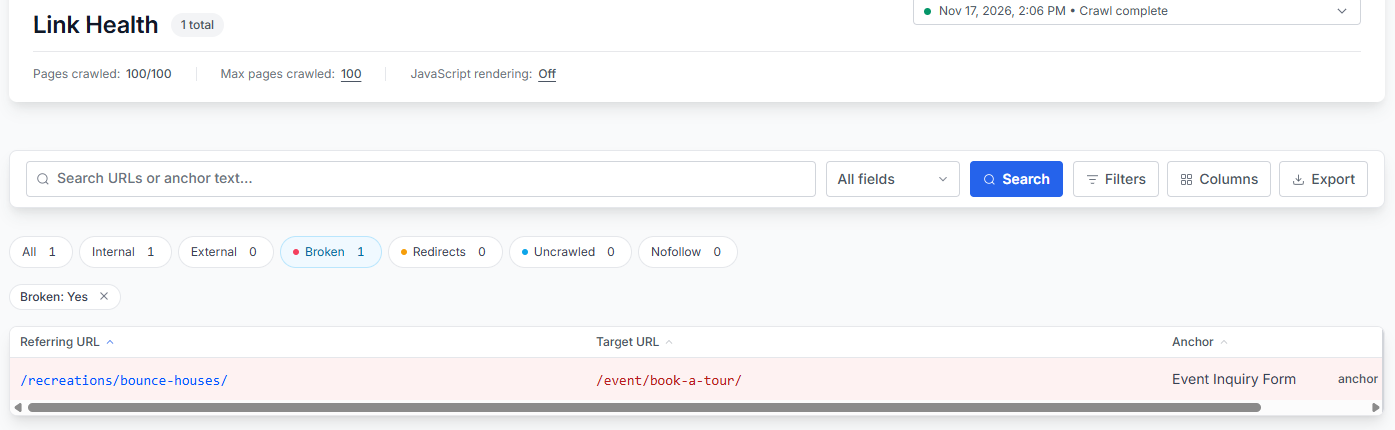
SpyFu Site Audit gathers them in Link Health. It lists every broken link with the page it's on, along with redirect chains and links that point at a redirect.
Filter by type to work through one problem at a time, starting with broken links, since those are the dead ends. Each one shows the page the link sits on, so you know which page to open and which link to update with the fixes above.
If someone else edits your site, export the list and hand it over as their to-do list. And if you're not sure how to fix an issue, its how-to guide walks you through the steps.
The same crawl also flags orphan pages, the pages no other page on your site links to.
Links keep breaking as your site changes, so this isn't a one-time job. Schedule your crawl to run weekly or monthly, and new broken links show up before your visitors find them. For how to pick a rhythm, see how often to run an SEO audit.
