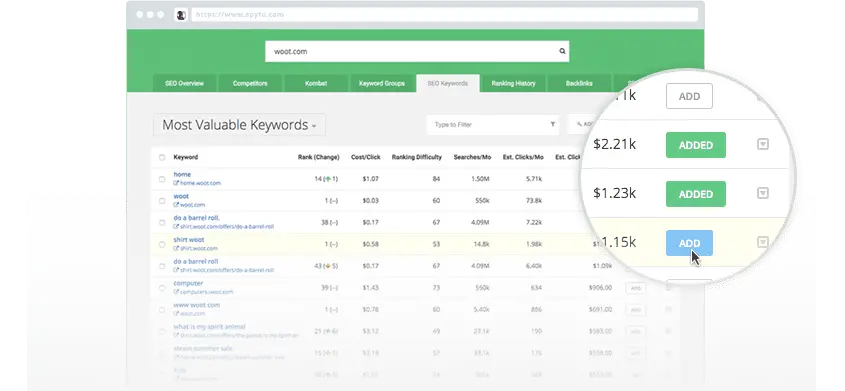
See competitors’ PPC keywords and Google Ads.
Explore paid keywords, ad copy and landing pages with a Google Ads spy tool.
Research competitors’ paid keywords and estimated costs.
Explore a domain’s observed paid keywords and the estimated costs and clicks around them. Use filters to narrow broad research into relevant campaign ideas.
Observed paid keywords show searches where ads appeared. Review the message and destination alongside click and cost estimates to understand the offer.
Explore the domain’s available keyword history and look for terms it returned to month after month. Review ad groups to understand how it organizes related searches and where its messaging is focused.
Read PPC keyword filters and estimatesA keyword, its ad and its destination

Terms
search phrases and keyword groups.
Estimates
compare cost and click context.
History
investigate recurring and changing activity.
See the Google Ads behind each keyword.
A search term is only one part of a campaign. Examine the associated message and destination before deciding how your offer should compete.

Shortlist relevant searches
Shortlist searches relevant to your offer.
Read the observed ads
Inspect their ad copy and historical context.

Choose a focused test
Choose a bounded keyword and message test.
Build and export a PPC keyword shortlist.
Filter by estimated cost, clicks and phrases to build a list that fits your offer. Export selected keywords for your campaign planning, then adapt the ad groups and copy to your business.
SpyFu has collected paid-search observations since 2006. Look through the available history to see how a competitor’s keyword coverage and ad copy evolved, rather than relying on one recent snapshot.
From competitor coverage to your own plan
Narrow the list
Compare cost, click estimates and relevant phrases.
Understand the groups
Study how related keywords connect with an advertiser’s messages.
Carry the research forward
Export selected keywords and adapt the plan to your own campaign.
PPC keyword research questions.
Can I see where a competitor’s ads appeared?
Research its domain to explore observed paid keywords with estimated click and cost context. Narrow the list to relevant campaign ideas.
Can I explore ads associated with a keyword?
Yes. Follow relevant terms into the associated ad copy, destination and historical observations to compare how the offer is presented.
Are the click and cost figures actual campaign results?
They are estimates for competitive research. Your own Google Ads reports provide your actual spend, clicks and conversions. Review relevance and test performance before committing budget.
Take a closer look.
Explore competitor keywords and ad context without assuming their spending proves success.
View plans